Alienware Aurora R9 Gaming Desktop Review: Specs, Price
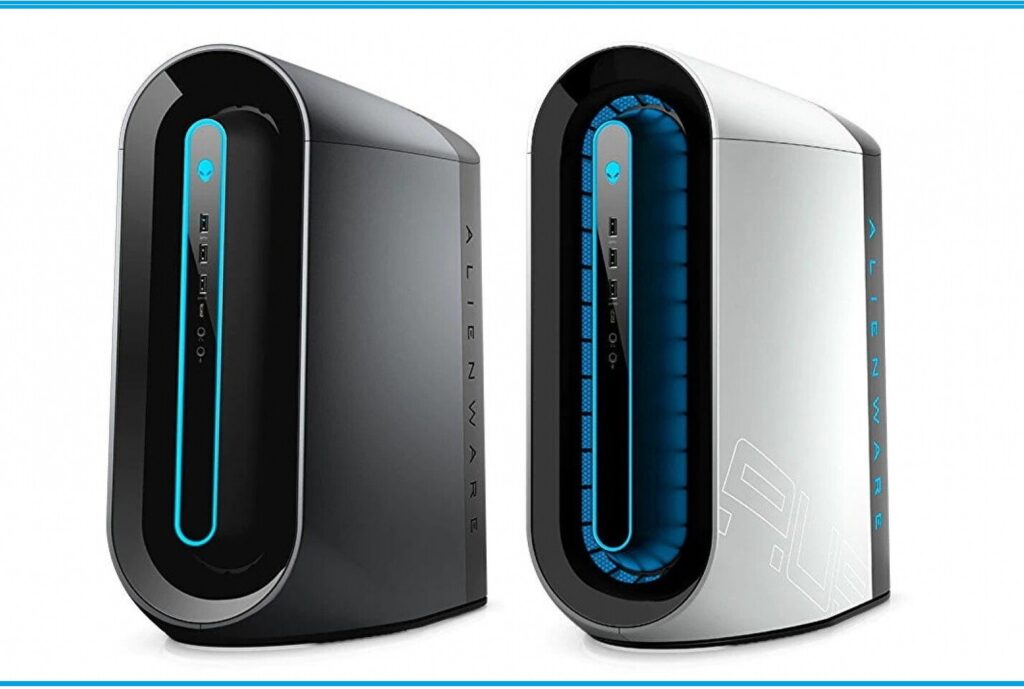
The Alienware Aurora R9 was one of Dell’s flagship prebuilt gaming desktops, launched in 2019 with 9th Gen Intel Core processors, NVIDIA RTX 20-series graphics and a distinctive, futuristic case. It started at $969.99, scaled up to a Core i9-9900K and RTX 2080 Ti, and was built to be upgraded.
Several generations of Aurora have launched since then. This updated review keeps the original R9 verdict and adds what you need today: specs, upgrade options, Windows 11 support, BIOS tips, a comparison with newer Aurora models and whether the R9 is still worth buying. Updated October 2026.
Quick Answer: The Aurora R9 is no longer the latest Alienware desktop. It is a capable, upgradeable older rig that can still make sense used or refurbished at a fair price. If you are buying new, look at the current Alienware Aurora instead.
📑 Table Of Contents
- Alienware Aurora R9 Overview
- Latest Updates: What Changed Since The Aurora R9
- Alienware Aurora R9 At A Glance: Who, What, When, Where, Why And How
- Alienware Aurora R9 Specs And Product Details
- Alienware Aurora R9 Performance And Cooling
- Alienware Aurora R9 Design: LED, Lunar Light And Interior
- A Wide Range Of Power: Configuration Options
- Alienware Aurora R9 Ports
- Alienware Aurora R9 Upgrade Guide
- Alienware Aurora R9 Windows 11 Support
- BIOS And Driver Update Tips
- Common Problems And Fixes
- Alienware Aurora R9 Vs Newer Aurora Models
- Is The Alienware Aurora R9 Worth Buying Today?
- Alienware Aurora R9 Pros And Cons
- People Also Search For
- Alienware Aurora R9 FAQ
- Final Verdict
1. Alienware Aurora R9 Overview
The Alienware Aurora R9 is a premium prebuilt gaming tower. The base price was reasonable for an Alienware, but the real draw was the range of hardware: you could configure it with Intel or AMD-based graphics choices and some of the strongest consumer parts of its time. Its case also brought some bold design cues, including a circular LED ring and Alienware’s signature styling.
It Is Not The Latest Aurora: Earlier versions of this review described the R9 as the newest Aurora. That is out of date. Dell has since released the Aurora R10 to R16 and a newer Aurora line with Intel Core Ultra processors and RTX 50-series graphics. Details are in the next section.
2. Latest Updates: What Changed Since The Aurora R9
Newer Alienware Aurora Models
| Model | Era | Highlights |
|---|---|---|
| Aurora R9 | 2019 | 9th Gen Intel Core, up to RTX 2080 Ti, DDR4 |
| Aurora Ryzen Edition R10 | 2020 | First Aurora with AMD Ryzen processors |
| Aurora R11 to R13 | 2020 to 2021 | Newer Intel generations; R13 used 12th Gen Intel (Alder Lake) |
| Aurora R14 to R15 | 2022 to 2023 | Ryzen and 13th Gen Intel options; R15 added optional overclocking and a rear cable cover |
| Aurora R16 | 2023 | Legend 3 design, clear side panel, quieter and cooler, first desktop with the revamped Alienware Command Center, RTX 40-series support |
| Alienware Aurora (current) | 2025 to 2026 | Intel Core Ultra processors, RTX 50-series graphics, DDR5 memory, Windows 11 |
What The Current Alienware Aurora Offers
On Dell’s US website the current Alienware Aurora gaming desktop was listed in one configuration with an Intel Core Ultra 7 265F, NVIDIA GeForce RTX 5060 Ti 8GB GDDR7, 32GB DDR5 memory and a 1TB M.2 NVMe SSD, with Windows 11 Home. Dell listed a custom build starting at $1,799.99 at the time of writing. Dell changes pricing and promotions often, so check the live page before you decide.
Why It Matters: A current Aurora uses DDR5 and newer platforms, so you cannot move parts between it and an R9. If you want your next PC to stay useful for years, the newer platform has a longer upgrade path and software support life.
Windows 10 Support Has Ended
The R9 shipped with Windows 10. Microsoft ended regular Windows 10 support in October 2025, and its one-year consumer Extended Security Updates program is scheduled to end in October 2026. If your R9 still runs Windows 10, move to Windows 11 (see the Windows 11 section below) to keep getting security updates.
3. Alienware Aurora R9 At A Glance: Who, What, When, Where, Why And How
- Who is it for? Gamers who want a prebuilt desktop with room to upgrade, or bargain hunters shopping for a used or refurbished Alienware.
- What is it? A mid-tower gaming PC with 9th Gen Intel Core processors and NVIDIA or AMD graphics options.
- When was it released? 2019, with the base model starting at $969.99.
- Where can you buy one now? Mostly used or refurbished listings, since Dell has moved on to newer Aurora models.
- Why choose it? A recognizable design, strong airflow, a tool-free interior and plenty of ports.
- How do you keep it current? Upgrade the GPU, RAM and SSD, update the BIOS, and move to Windows 11.
4. Alienware Aurora R9 Specs And Product Details
This is the configuration covered in the original review:
| Component | Details |
|---|---|
| Model | Alienware Aurora R9 Gaming Desktop (AWAUR9-7674WHT) |
| Processor | 9th Gen Intel Core i7-9700K |
| Graphics | NVIDIA GeForce RTX 2080 Super 8GB GDDR6 |
| Memory | 16GB RAM |
| Storage | 256GB SSD plus 2TB storage |
| Operating System | Windows 10 Home 64-bit (upgrade to Windows 11 recommended) |
5. Alienware Aurora R9 Performance And Cooling
The Aurora R9 supports a liquid-cooling option and was designed with custom upgrades and overclocking in mind, including factory overclocking on 9th Gen unlocked processors. Liquid cooling keeps an overclocked Core i7 or Core i9 under control during long sessions.
Real-world performance depends heavily on the configuration. With an RTX 2080 Super or RTX 2080 Ti, the R9 handles 1080p and 1440p gaming well and supports ray tracing and DLSS 2. It cannot use DLSS 3 frame generation, which requires an RTX 40-series GPU or newer.
Want to test your rig? Open-world titles are a good stress test, and our guides for the GPO map and getting Elytra in Minecraft cover two popular games that run comfortably on this hardware.
6. Alienware Aurora R9 Design: LED, Lunar Light And Interior
Alluring LED Ring
A striking feature is the circular LED on one of the side panels, which echoes Alienware’s laptop designs. The lighting is customizable, so you are not stuck with blue. That sets it apart from the budget Dell G5 gaming tower launched alongside it, which only offers a darker blue light.
Lunar Light Vs Dark Side Of The Moon
The right side of the case has an etched logo with an Alienware logo LED toward the rear, a more elegant approach than flashier gaming cases. The text illumination is only available in the white Lunar Light color. The gray Dark Side of the Moon option does not include it, which is why the starting price applies to Dark Side of the Moon while Lunar Light costs more for the extra lighting zone.
Function-First Interior
Removing the side panel is easy, but the interior is plain and somewhat messy compared with a showpiece build. It favors function over form, similar to Dell’s other gaming desktops. Even the cheaper Dell G5 offered an optional window with a tidier interior, while the Aurora R9 has no window at all.
There are clever touches though. The power supply sits in a silver housing that swings open, which gives easy access to the components underneath and saves space.
7. A Wide Range Of Power: Configuration Options
| Part | Options |
|---|---|
| Graphics (NVIDIA) | GTX 1650 up to RTX 2080 Ti, with dual RTX 2080 options on some builds |
| Graphics (AMD) | Radeon RX 5700 and RX 5700 XT |
| Processor | Intel Core i3-9100 up to Core i9-9900K, with Core i5 and i7 choices in between |
| Storage | SSD, HDD or dual-drive setups, including up to a 2TB M.2 SSD plus a large hard drive |
| Memory | 8GB up to 64GB, including Intel Optane-accelerated options |
8. Alienware Aurora R9 Ports
Because of the layout, the front ports are oriented vertically inside the LED ring: two USB 3.1 ports, a USB-C port and a headphone jack. It is not a lot, but having USB-C on the front is convenient.
The back has a generous standard set: a USB-C port, four USB 3.1 ports, five USB 2.0 ports, an Ethernet jack, DisplayPort and audio jacks.
9. Alienware Aurora R9 Upgrade Guide
| Upgrade | What To Know |
|---|---|
| RAM | Supports up to 64GB DDR4. Use matched pairs for dual-channel. |
| Storage | Add an M.2 NVMe SSD and use the SATA ports for extra drives. Move Windows to the SSD for faster boots. |
| Graphics Card | Check power supply wattage, power connectors and card length before buying. |
| CPU | Limited to 9th Gen Intel on this platform; a Core i9-9900K is the top option Dell offered. |
| Cooling | Keep dust filters and vents clean; consider the liquid-cooling option if you overclock. |
| Wi-Fi | Check whether your model has built-in Wi-Fi; add a PCIe or USB adapter if not. |
Check Compatibility First: Alienware desktops often use Dell-specific components, such as the power supply and parts of the motherboard layout. Confirm compatibility with your Service Tag before buying standard PC parts.
Best Value Upgrade: If your R9 still has a SATA drive as the main drive, moving Windows to an M.2 NVMe SSD gives the most noticeable everyday speed-up for the least money.
10. Alienware Aurora R9 Windows 11 Support
Windows 11 officially needs an 8th Gen Intel Core processor or newer, TPM 2.0 (Intel PTT counts), UEFI with Secure Boot and at least 64GB of storage, as listed on Microsoft’s Windows 11 specifications page. The R9’s 9th Gen processors meet the CPU requirement, so the PC should be eligible. Here is how to upgrade:
- Back up your files.
- Run Microsoft’s PC Health Check app to confirm eligibility.
- Update the BIOS and drivers (see below).
- Make sure TPM (Intel PTT) and Secure Boot are enabled in the BIOS.
- Open Settings > Windows Update and install the Windows 11 upgrade when offered.
If you see a compatibility error, read our guide to fixing the “This PC can’t run Windows 11” error. If you plan a clean install, learn which partition style to pick in our MBR vs GPT guide: Windows 11 needs UEFI with a GPT system disk.
11. BIOS And Driver Update Tips
- Download BIOS and drivers only from Dell’s official support site using your Service Tag.
- Back up your data and connect the PC to stable power before flashing the BIOS.
- Turn off Windows Fast Startup before updating.
- If the update does not apply from inside Windows, users in Dell’s community report success by flashing from the F12 One Time Boot menu.
- Update one BIOS version at a time instead of skipping versions.
- Never turn the PC off during a BIOS flash.
12. Common Problems And Fixes
| Problem | Likely Fix |
|---|---|
| No display after installing a graphics card | Plug the monitor into the graphics card, not the motherboard, and reseat the card and power cables |
| Loud fans or high temperatures | Clean dust from filters and vents, improve room airflow and check the cooling setup |
| Lights not responding | Update or reinstall Alienware Command Center and the BIOS |
| Windows 11 upgrade not offered | Enable TPM (Intel PTT) and Secure Boot, update the BIOS and run PC Health Check |
| Slow boot and loading | Move Windows to an NVMe SSD and keep at least 20% of the drive free |
13. Alienware Aurora R9 Vs Newer Aurora Models
| Feature | Aurora R9 | Aurora R16 | Current Aurora |
|---|---|---|---|
| Processor | 9th Gen Intel Core | 13th Gen Intel Core | Intel Core Ultra |
| Graphics | Up to RTX 2080 Ti | Up to RTX 40-series | RTX 50-series |
| Memory | DDR4, up to 64GB | DDR5 | DDR5 |
| Side Window | No | Clear side panel | Clear side panel |
| Operating System | Windows 10 (upgradeable) | Windows 11 | Windows 11 |
| Availability | Used and refurbished | Limited, older stock | Sold new by Dell |
14. Is The Alienware Aurora R9 Worth Buying Today?
It can be, if the price is right. A used R9 with an RTX 2080 Super or 2080 Ti and a Core i7 or i9 can still deliver solid 1080p and 1440p gaming for much less than a new Alienware. But there are trade-offs: an older platform, no DLSS 3, Windows 11 setup work and a limited upgrade ceiling.
Used Buyer Checklist
- Check the Service Tag on Dell’s site for original specs and warranty status.
- Ask for photos of the inside, especially the power supply and graphics card.
- Run a stress test to check temperatures and stability.
- Confirm the SSD and hard drive health.
- Make sure Windows is activated and the BIOS is up to date.
- Compare the price with a new budget gaming desktop before you pay.
Do Not Overpay: If a used R9 is priced close to a current entry-level gaming desktop, the newer machine is usually the better buy because of its warranty, DDR5 platform and newer GPU.
15. Alienware Aurora R9 Pros And Cons
| Pros | Cons |
|---|---|
| Attractive design with customizable lighting | A bit pricey for what you get |
| Great airflow | Big, massive tower |
| Plenty of ports, including USB-C | No window to view components |
| Wide choice of configurations and room to upgrade | Older 9th Gen platform, no DLSS 3 |
| Tool-free access and clever power supply housing | Dell-specific parts can limit upgrades |
16. People Also Search For
17. Alienware Aurora R9 FAQ
Q1. Is The Alienware Aurora R9 Still Worth Buying?
Only at the right price. The R9 launched in 2019 with 9th Gen Intel processors and RTX 20-series graphics. A well-priced used or refurbished unit with an RTX 2080 Super or similar can still play most games at 1080p and 1440p, but newer Aurora models offer faster CPUs, DDR5 memory, RTX 50-series graphics and longer support. Compare the price against a current budget gaming desktop before you buy.
Q2. Is The Alienware Aurora R9 The Latest Alienware Aurora?
No. The Aurora R9 is several generations old. Dell followed it with the Aurora R10 (Ryzen Edition), R11, R12, R13, R14, R15 and R16, and the current Alienware Aurora is sold without an R number, with Intel Core Ultra processors and NVIDIA RTX 50-series graphics on Dell’s website.
Q3. What Are The Alienware Aurora R9 Specs?
The Aurora R9 supports 9th Gen Intel Core i3 to Core i9-9900K processors, NVIDIA GeForce GTX 1650 up to RTX 2080 Ti graphics (or AMD Radeon RX 5700 and RX 5700 XT), 8GB to 64GB of RAM, M.2 SSD plus hard drive storage, and an optional liquid-cooling setup. The model reviewed here uses a Core i7-9700K, RTX 2080 Super 8GB, 16GB RAM, a 256GB SSD and 2TB of storage.
Q4. Can The Alienware Aurora R9 Run Windows 11?
It should. Windows 11 officially requires an 8th Gen Intel processor or newer, TPM 2.0 (Intel PTT counts), UEFI with Secure Boot and 64GB of storage, and the R9’s 9th Gen processors meet the CPU requirement. Run Microsoft’s PC Health Check app and update the BIOS first, then check Windows Update for the upgrade offer.
Q5. Can I Upgrade The Graphics Card In The Alienware Aurora R9?
Yes, within limits. The R9 has a PCIe x16 slot, but the power supply and case size restrict which cards fit. Check your power supply wattage on the label inside the case, compare it with the new card’s power requirement, and measure the card length before buying.
Q6. How Much RAM Can The Alienware Aurora R9 Support?
Dell configured the Aurora R9 with 8GB up to 64GB of DDR4 memory, with Intel Optane options on some builds. Install matching modules in pairs for dual-channel performance.
Q7. How Do I Update The BIOS On An Alienware Aurora R9?
Download the latest BIOS from Dell’s support page for your Service Tag, back up your files, plug the PC into stable power and run the update. Many users in Dell’s community report better results by turning off Windows Fast Startup first and flashing from the F12 One Time Boot menu. Update one version at a time and never power off during the flash.
Q8. Does The Alienware Aurora R9 Have A Window?
No. The Aurora R9 has a solid side panel with an LED ring and logo lighting, and no clear side window, which is one of the most common complaints about the design. Newer Aurora models such as the R15 and R16 added a clear side panel.
Q9. What Is The Difference Between Alienware Aurora R9 And R10?
The R9 is an Intel-only design built around 9th Gen Core processors. The Aurora Ryzen Edition R10 introduced AMD Ryzen processors and newer graphics options. Both are older designs, so compare pricing and warranty status carefully if you are shopping used.
Q10. How Much Does The Alienware Aurora R9 Cost Now?
The R9 started at $969.99 when it launched, but new stock is no longer sold by Dell. Prices on used and refurbished listings vary widely with the CPU, graphics card and condition, so check recent sold listings and Dell Outlet rather than relying on the original launch price.
Q11. Is The Alienware Aurora R9 Good For Gaming?
With an RTX 2080 Super or RTX 2080 Ti it handles 1080p and 1440p gaming well in most titles and supports ray tracing and DLSS 2. It does not support DLSS 3 frame generation, which needs an RTX 40-series card or newer, so very demanding new games may need lower settings.
Q12. Where Can I Download Alienware Aurora R9 Drivers?
Use Dell’s official support site, enter your Service Tag, and download the BIOS, chipset, graphics, audio and Alienware Command Center packages from there. Avoid third-party driver sites.
18. Final Verdict
The Alienware Aurora R9 is a high-quality prebuilt computer with a unique, futuristic design that only Alienware can pull off, plenty of ports and strong upgrade options. It was never the cheapest choice, and today it is an older platform.
If you love the R9 design and find one at a fair used or refurbished price, it remains a solid, upgradeable gaming PC, especially after a move to Windows 11 and an NVMe SSD. If you are buying new, choose the current Alienware Aurora or another modern gaming desktop.
You can also explore our BestTarahi.com Review for more practical tips and helpful insights.
About Author