Dokie AI Review: How PPT Templates Power An AI Slides Generator For On-Brand, Readable Decks
FreePik.com
What Is Dokie AI?
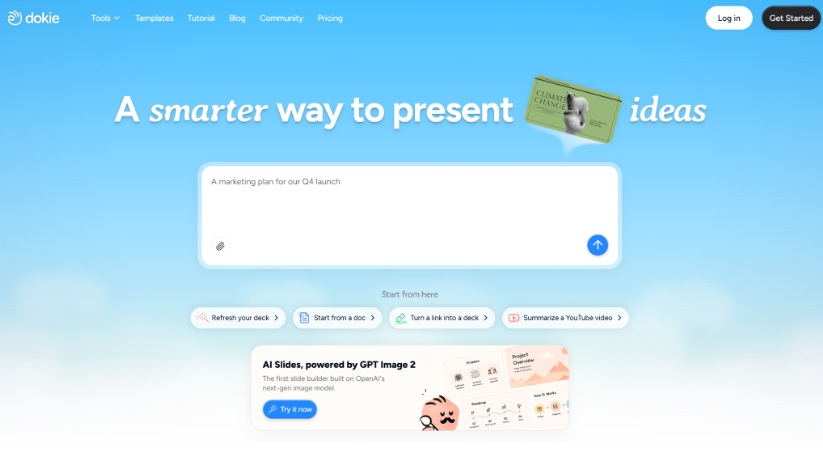
Dokie AI is an AI slides generator that helps users create editable slide decks from ideas, outlines, notes, documents, and research.
Instead of manually building every slide from scratch, users can start with content and let Dokie AI organize it into a presentation structure. This makes it useful for business professionals, teachers, students, marketers, founders, consultants, job seekers, and teams that need to create presentations regularly.
Dokie AI can help create:
Business reports
Work presentations
Classroom slides
Teaching materials
Student projects
Research presentations
Training decks
Portfolio presentations
Interview decks
Marketing and sales decks
Project updates
The core value of Dokie AI is simple: it helps users move from raw information to a clearer, more presentable slide deck.
Why PPT Templates Matter in an AI Slides Generator
A good AI slides generator should not only create content. It also needs to make that content easy to read, visually organized, and suitable for the audience.
A PPT template gives the presentation a consistent visual system. It can guide the layout, typography, spacing, colors, hierarchy, and overall style of the deck.
Without a strong template, AI-generated slides can feel inconsistent. One slide may be text-heavy, another may feel empty, and the overall deck may lack a clear visual identity.
With the right PPT template, an AI slides generator can create decks that feel more polished and easier to follow.
Dokie AI Review: How Templates Improve the Slide Creation Workflow
Dokie AI is useful because it focuses on both structure and presentation clarity. It helps users organize their ideas into slides, while PPT templates help those slides look consistent and readable.
This combination matters because most presentation problems are not only design problems. They are communication problems.
A good deck needs:
A clear message
Logical slide flow
Readable content
Consistent visual style
Audience-friendly structure
Easy editing after generation
Dokie AI helps with the structure, while templates help with the visual system.
1. PPT Templates Create Visual Consistency
Visual consistency makes a deck feel professional.
When slides use the same design system, the audience can focus on the message instead of being distracted by changing fonts, uneven spacing, or inconsistent layouts.
PPT templates help maintain consistency across:
Cover slides
Agenda slides
Section dividers
Content slides
Comparison slides
Data slides
Image slides
Summary slides
Closing slides
For business presentations, this consistency helps protect brand identity. For education presentations, it helps students follow the lesson more easily. For portfolio or interview decks, it makes the presenter look more prepared and professional.
2. Templates Make AI-Generated Slides More Readable
Readability is one of the most important parts of presentation design.
A slide should not force the audience to read a wall of text. It should highlight the main idea quickly and support what the presenter is saying.
PPT templates can improve readability by using:
Clear title areas
Logical text hierarchy
Balanced spacing
Readable font sizes
Simple content blocks
Visual contrast
Defined areas for images, charts, and callouts
When Dokie AI generates a deck, a strong template can help turn the content into a more readable format. This is especially useful for reports, training slides, classroom decks, and research presentations where information can become dense.
3. Templates Help Keep Decks On-Brand
For companies, teams, agencies, schools, and creators, brand consistency matters.
An on-brand deck uses the right colors, tone, layout style, and visual identity. This makes presentations feel more credible and recognizable.
PPT templates can help keep decks aligned with:
Company branding
Team style guidelines
School or institution identity
Client presentation standards
Personal portfolio style
Product marketing visuals
Internal reporting formats
For example, a marketing team may need every campaign report to follow the same structure. A consultant may need client decks to feel polished and consistent. A teacher may want classroom slides to follow a familiar format across lessons.
Dokie AI can help users create the content and structure, while templates help maintain the visual identity.
4. Templates Reduce Manual Formatting Work
Manual slide formatting takes time.
Even after writing the content, users often spend hours adjusting layouts, resizing text boxes, aligning objects, choosing colors, and fixing spacing.
PPT templates reduce this work by giving users a ready-made design framework.
Instead of asking, “How should this slide look?” users can focus on a better question: “What should this slide communicate?”
This is where an AI slides generator becomes more useful. Dokie AI can help create a structured draft, and templates can reduce the amount of design cleanup needed after generation.
5. Templates Support Different Presentation Use Cases
Not every presentation should look the same.
A startup pitch deck, a classroom lesson, a quarterly report, and a student project all have different goals. PPT templates help users match the deck style to the use case.
Business reports
Business reports need clarity, hierarchy, and practical structure. A good template can help organize metrics, key findings, charts, risks, and next steps.
Sales presentations
Sales decks need to guide the audience from pain points to solutions. Templates can help structure product benefits, customer examples, pricing, and calls to action.
Classroom slides
Classroom decks need to be easy to follow. Templates can help teachers present definitions, examples, activities, summaries, and discussion questions.
Student projects
Student presentations need structure and readability. A template can help students organize research, arguments, visuals, and conclusions.
Training decks
Training slides need step-by-step clarity. Templates can help present processes, instructions, scenarios, checklists, and review questions.
Portfolio decks
Portfolio presentations need a clean visual flow. Templates can help show projects, skills, results, case studies, and personal branding.
6. Templates Help Structure Complex Information
Some presentations are difficult because the topic is complex.
This is common in research presentations, business analysis, market research, project reviews, and training materials. The problem is not only writing the content. The bigger challenge is deciding how to organize it.
A good PPT template can provide layout patterns for complex information, such as:
Problem and solution slides
Before-and-after slides
Timeline slides
Process slides
Comparison slides
Framework slides
Data summary slides
Key insight slides
Recommendation slides
Dokie AI can help turn raw information into a logical slide sequence. Templates then help present that sequence in a format that is easier for the audience to understand.
7. Templates Make Editing Easier After AI Generation
AI-generated presentations usually need editing. That is normal.
You may need to adjust examples, add data, remove unnecessary text, change wording, or refine the order of slides. Editable decks are important because no AI tool can fully understand every company, classroom, audience, or project context.
PPT templates make editing easier because they provide a consistent design system. When you add or revise slides, you can keep the deck visually aligned instead of redesigning each slide manually.
This is especially useful for users who create recurring presentations, such as:
Weekly reports
Monthly reviews
Lesson decks
Client updates
Sales proposals
Training sessions
Portfolio updates
Research summaries
Dokie AI and PPT Templates: A Better Workflow for Slide Creation
A practical AI presentation workflow should not only be fast. It should also produce decks that are easy to read, edit, and present.
Here is a simple workflow users can follow with Dokie AI:
Start with your idea, notes, document, outline, or research.
Use Dokie AI to generate a structured presentation draft.
Choose or apply a suitable PPT template.
Review the slide flow and remove unnecessary content.
Add specific examples, data, visuals, or brand details.
Edit the final deck for clarity and readability.
This workflow helps users avoid two common problems: starting from a blank page and spending too much time fixing messy slides.
Dokie AI Review: Pros and Cons
Pros
Dokie AI is useful for turning rough content into structured slides. It helps users create business-ready and education-ready presentations faster.
It supports many practical use cases, including business reports, classroom slides, teaching materials, student projects, portfolio decks, interview presentations, research decks, and training slides.
Its value becomes stronger when paired with PPT templates because templates improve consistency, readability, and visual quality.
Cons
Dokie AI, like any AI slides generator, still requires human review.
Users should check facts, adjust the tone, refine slide logic, and make sure the final deck fits the audience. Templates can improve design consistency, but users still need to choose the right template for the presentation goal.
For important presentations, AI should support the workflow rather than replace thoughtful editing.
Common Mistakes to Avoid When Using PPT Templates with AI Slides
Choosing a template only because it looks attractive
A beautiful template is not always the right template. Choose based on the audience, topic, and presentation goal.
Using too much text
Even with a good template, text-heavy slides can be hard to read. Keep each slide focused on one main idea.
Ignoring brand consistency
If the deck is for a company, client, or school, make sure colors, fonts, and visuals match the expected style.
Forgetting to edit AI-generated content
AI can create a strong first draft, but the final presentation should reflect your knowledge, examples, and context.
Using the same template for every deck
Different presentations need different structures. A pitch deck template may not work well for a training deck or classroom lesson.
How to Choose the Right PPT Template for an AI Slides Generator
The right PPT template depends on the purpose of the presentation.
For business reports, choose a clean and professional template with space for data, summaries, and recommendations.
For classroom slides, choose a readable template with clear section breaks and simple content layouts.
For portfolio decks, choose a visual template that highlights projects and results.
For training slides, choose a template that supports step-by-step explanations, examples, and checklists.
For pitch decks, choose a template that supports storytelling, market opportunity, product value, business model, and next steps.
A good template should support the message. It should not compete with the message.
Use Dokie AI to Present Your Ideas Clearly
Dokie AI helps users transform ideas, notes, outlines, documents, and research into clear, structured presentations.
For business users, Dokie AI can support reports, strategy decks, project updates, client presentations, sales materials, and training slides. With the help of PPT templates, these decks can stay more consistent and on-brand.
For students and teachers, Dokie AI can help create classroom slides, assignment guides, teaching resources, research presentations, and student project decks. Templates make the slides easier to follow and more visually organized.
The main benefit is clarity. Dokie AI helps create the structure, while PPT templates help make that structure readable, professional, and presentation-ready.
FAQs About Dokie AI and PPT Templates
What is Dokie AI?
Dokie AI is an AI presentation maker and AI slides generator that helps users turn ideas, notes, documents, outlines, and research into structured, editable slide decks.
How do PPT templates improve an AI slides generator?
PPT templates improve an AI slides generator by giving slides a consistent design system. They help with readability, layout, branding, spacing, and visual structure.
Can Dokie AI create on-brand presentations?
Dokie AI can help users create structured presentations that can be adapted to brand needs. When paired with suitable PPT templates, decks can look more consistent and aligned with brand style.
Is Dokie AI useful for business presentations?
Yes. Dokie AI can help create business reports, work decks, sales presentations, project updates, training slides, client decks, and strategy presentations.
Can teachers and students use Dokie AI?
Yes. Teachers can use Dokie AI for classroom slides, teaching materials, and assignment guides. Students can use it for class projects, research presentations, and portfolio decks.
Do PPT templates make presentations more readable?
Yes. A good PPT template improves readability by organizing content with clear titles, spacing, hierarchy, and visual structure. This helps the audience understand the message faster.
Should I edit slides after using Dokie AI?
Yes. AI-generated slides should always be reviewed. You should check the content, adjust examples, refine wording, and make sure the final deck matches your audience and goal.
Conclusion
Dokie AI is a practical AI slides generator for users who need to create structured, editable presentations from ideas, notes, documents, and research.
PPT templates make this workflow stronger by improving consistency, readability, and brand alignment. They help turn AI-generated drafts into decks that feel more polished and easier to present.
The best approach is to use Dokie AI for structure, use PPT templates for visual consistency, and then apply human judgment to refine the final message. This combination can help you create better business decks, classroom slides, training materials, research presentations, and professional portfolios with less manual work.
About Author