MLA Format: MLA Style Guide With Works Cited Examples
MLA Format Guide
What is MLA format? MLA format is the writing style of the Modern Language Association. Students use it mostly in English, literature, languages and other humanities classes. It tells you how to set up your pages, how to credit sources inside your text and how to build the MLA Works Cited page at the end. This guide explains MLA formatting step by step, with a clear MLA format example you can copy, using the current MLA 9th edition rules.
If you also write papers in the social sciences, read our matching guide on APA format and compare the two styles in section 12.
9th Edition
Current MLA version
1-Inch Margins
On all four sides
12-Point Font
Double-spaced
Author-Page
In-text citations
No Title Page
Unless required
Table Of Contents
- What Is MLA Format? (And What Is MLA?)
- MLA Style At A Glance (Who, What, When, Where, Why, How)
- MLA Formatting Basics: Margins, Font, Spacing And Indents
- MLA Style Format: Heading, Title And Header
- MLA Format Example (First Page)
- MLA Citation: In-Text Citations
- MLA Works Cited: How To Build The Page
- Works Cited Examples: Books, Articles, Websites And Videos
- Works Cited Generator: Should You Use One?
- How To Choose Sources You Can Cite
- Quotes, Numbers, Dates And Other MLA Rules
- MLA Vs APA: Quick Comparison
- MLA Format Checklist Before You Submit
- Frequently Asked Questions
- Conclusion
1. What Is MLA Format? (And What Is MLA?)
If you are asking what is MLA, the answer is simple: MLA stands for the Modern Language Association, a group of scholars who study language and literature. People also use “MLA” to mean the citation and writing style the group publishes in the MLA Handbook. So when a teacher asks for MLA style, they mean this set of rules.
So, what is MLA format in practice? It is a way to lay out your paper, credit your sources inside the text and list those sources at the end. Following it keeps your writing consistent and shows your readers exactly where your ideas and quotes came from.
2. MLA Style At A Glance (Who, What, When, Where, Why, How)
| Question | Answer |
|---|---|
| Who | Students and writers in English, literature, languages, cultural studies and many other humanities subjects, mostly in the United States and Canada. |
| What | The writing and citation style of the Modern Language Association, now in its 9th edition (April 2021). |
| When | Any time a class, school or publisher asks for MLA, such as an essay, research paper or literary analysis. |
| Where | In Word, Google Docs or any word processor. The official MLA Style Center at style.mla.org has more examples. |
| Why | To keep papers consistent, give credit to other writers and avoid plagiarism. |
| How | Set the page up, add the heading and header, cite with author and page, then end with a Works Cited page. |
3. MLA Formatting Basics: Margins, Font, Spacing And Indents
These are the core rules of MLA formatting. Set them once in your word processor and your whole paper will follow them.
| Element | MLA Rule |
|---|---|
| Paper size | 8.5 x 11 inch (Letter) paper |
| Margins | 1 inch on all four sides |
| Font | A readable font; 12-point Times New Roman is the usual choice |
| Line spacing | Double-space everything, including quotes and the Works Cited page |
| Paragraphs | Indent the first line 0.5 inch; no extra space between paragraphs |
| Alignment | Left-aligned text (do not justify) |
| Page numbers | Last name and page number in the top right header, 0.5 inch from the top, on every page |
| Spaces after punctuation | One space after a period or other end punctuation |
4. MLA Style Format: Heading, Title And Header
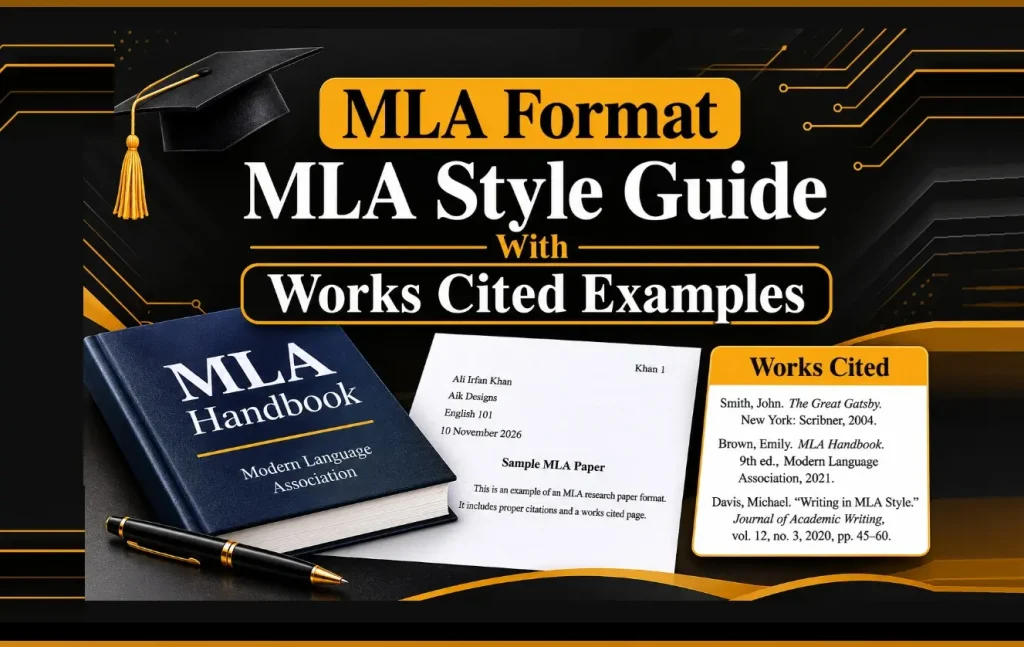
The first page of an MLA style format paper has no separate cover page. Instead, put this information at the top left of page 1, one item per line, double-spaced:
- Your full name
- Your instructor’s name
- The course name and number
- The date, written as day month year, for example 11 November 2026
Title: Center the title on the next line. Use title case, and do not bold, underline, italicize or put the title in quotation marks. Do not add an extra blank line between the title and the first paragraph.
Header: In the top right corner of every page, type your last name, a space and the page number, for example Khan 1. Use your word processor’s automatic page number tool so the number updates on every page.
When Do You Need A Title Page?
Usually never. MLA does not require one for a standard paper. If your instructor asks for a title page, put the title in the upper third of the page, followed by your name, instructor, course and date, and still use the Last Name + Page Number header on later pages.
5. MLA Format Example (First Page)
Here is an MLA format example showing how the top of page 1 should look. It uses placeholder names, so replace each line with your own details.
6. MLA Citation: In-Text Citations
An MLA citation has two parts: a short note in the text and a full entry on the Works Cited page. In the text, MLA uses the author-page method. Put the author’s last name and the page number in parentheses, with no comma between them, and place it before the final period.
| Situation | In-Text Citation |
|---|---|
| One author | (Smith 45) |
| Two authors | (Smith and Jones 45) |
| Three or more authors | (Smith et al. 45) |
| Author named in the sentence | Smith argues that … (45). |
| No author | (“Short Title” 12) |
| Web page with no page numbers | (Smith) |
| Two works by the same author | (Smith, Short Title 45) |
For a quote longer than four lines of text, use a block quote: start it on a new line, indent the whole block 0.5 inch, leave out quotation marks and put the parenthetical citation after the final punctuation.
7. MLA Works Cited: How To Build The Page
The works cited page lists every source you quoted, paraphrased or summarized. Follow these steps for correct MLA format works cited layout:
- Start a new page at the end of your paper.
- Type Works Cited at the top, centered. Do not bold, italicize, underline or put it in quotation marks.
- List entries in alphabetical order by the author’s last name. If there is no author, use the first main word of the title and ignore “A,” “An” and “The.”
- Double-space the whole page, with no extra space between entries.
- Use a hanging indent of 0.5 inch: the first line sits at the left margin and the following lines are indented.
- Keep the same Last Name + Page Number header at the top right.
The MLA 9 Template Of Core Elements
MLA 9 uses one simple template for every kind of source. Fill in each element you can find and skip the ones that do not apply:
A “container” is the larger work that holds your source, such as a journal that holds an article or a website that holds a page.
8. Works Cited Examples: Books, Articles, Websites And Videos
Use these templates for your works cited entries. Titles that need italics are shown in italics in the examples below.
Book:
Last Name, First Name. Title of Book. Publisher, Year.
Book with two authors:
Last Name, First Name, and First Name Last Name. Title of Book. Publisher, Year.
Journal article:
Last Name, First Name. “Title of Article.” Title of Journal, vol. 12, no. 3, 2020, pp. 45-67. www.example.com/article.
Web page:
Last Name, First Name. “Title of Page.” Name of Website, Publisher, 5 May 2024, www.example.com/page.
Web page with no author:
“Title of Page.” Name of Website, Publisher, 5 May 2024, www.example.com/page.
YouTube video:
“Title of Video.” YouTube, uploaded by Channel Name, 5 May 2024, www.youtube.com/watch?v=xxxxxxx.
Online news article:
Last Name, First Name. “Title of Article.” Name of Newspaper, 5 May 2024, www.example.com/article.
9. Works Cited Generator: Should You Use One?
A works cited generator is an online tool that builds MLA entries from a URL, ISBN or title. It is fast and it is one of the most searched student tools. However, it is not always right.
How To Use A Works Cited Generator
- Pick MLA 9th edition in the style menu.
- Choose the source type: website, book, article, video and so on.
- Paste the URL or ISBN, or search by title.
- Fill in missing details such as the author, publisher or date.
- Copy the entry into your Works Cited page and sort the list alphabetically.
- Check every entry against the rules and examples in this guide.
| Feature | Works Cited Generator | Manual Citation |
|---|---|---|
| Speed | Seconds per source | Slower |
| Accuracy | Good for basics, needs checking | As accurate as you are |
| Unusual sources | Often needs manual fixes | Follow the MLA examples |
| Learning value | Low | High |
| Best for | Long source lists | Final check of every entry |
10. How To Choose Sources You Can Cite
MLA entries start with the author and end with the publisher and date, so the best sources are the ones where you can actually find those details. Before you cite a website, ask yourself:
- Is there a named author or organization?
- Is there a clear publisher and a date?
- Does the site have an About page, editorial policy and working contact details?
- Can you check the facts against a second, trusted source?
Many sites fail these checks. In our Educationtrove Com review, we found no named authors and an unclear owner, which makes it hard to build a proper citation. The same issue appears on EducationBeing. Use sites like these for general reading at most, and cite books, journals, libraries and university or government pages in your Works Cited list when you can.
11. Quotes, Numbers, Dates And Other MLA Rules
Short Quotes And Block Quotes
Put short quotes (up to four lines) in quotation marks inside your paragraph. Use a block quote for anything longer, as shown in section 6.
Titles Of Works
Use italics for titles of stand-alone works such as books, films, websites and journals. Use quotation marks for shorter parts such as articles, poems, chapters and web pages.
Numbers
Spell out numbers that can be written in one or two words, such as “seven” and “forty.” Use numerals for numbers that need more words, such as “250.” Do not start a sentence with a numeral.
Dates
Write dates in day month year order with no commas, for example 11 November 2026. In Works Cited entries, shorten long month names: Jan., Feb., Aug., Sept., Oct., Nov. and Dec. Do not shorten May, June or July.
Headings And Sections
MLA does not require headings in a short essay. If you use them, keep the style the same throughout. A common option is to number sections with an Arabic numeral and a period, and write the heading in title case.
12. MLA Vs APA: Quick Comparison
| Feature | MLA | APA |
|---|---|---|
| Common subjects | English, literature, humanities | Psychology, education, social sciences |
| In-text citation | (Smith 45) | (Smith, 2020) |
| Source list title | Works Cited | References |
| Title page | Not needed; heading on page 1 | Required for most papers |
| Header | Last name + page number | Page number (student papers) |
| Date emphasis | Near the end of the entry | Right after the author |
Need the other style? See our full guide to APA format.
13. MLA Format Checklist Before You Submit
- ✅ 1-inch margins and a 12-point readable font
- ✅ Double-spaced from top to bottom
- ✅ Last name and page number in the top right of every page
- ✅ Name, instructor, course and date at the top left of page 1
- ✅ Centered title in plain title case
- ✅ 0.5 inch indent at the start of each paragraph
- ✅ Every quote and paraphrase has an author-page citation
- ✅ Works Cited starts on a new page with a centered plain title
- ✅ Entries are alphabetical with a hanging indent
- ✅ Every in-text citation matches a Works Cited entry, and the other way round
Frequently Asked Questions
1. What is MLA format?
MLA format is the writing and citation style of the Modern Language Association. It is used mostly in English, literature, languages and humanities classes. It sets rules for page layout, the heading, in-text citations and the Works Cited page.
2. What is MLA?
MLA stands for the Modern Language Association, a professional organization for scholars of language and literature. People also use the word to mean the citation and formatting style it publishes in the MLA Handbook.
3. What is the correct MLA format for a paper?
Use 1-inch margins, a readable 12-point font such as Times New Roman, double spacing, a 0.5 inch paragraph indent and a header with your last name and page number in the top right corner. Put your name, instructor, course and date at the top left of page 1, then a centered title, then your text.
4. Does MLA format need a title page?
No. A standard MLA paper does not need a separate title page. Put your name, instructor, course and date at the top of the first page instead. Add a title page only if your instructor asks for one.
5. How do I write an MLA in-text citation?
Use the author’s last name and the page number in parentheses with no comma, such as (Smith 45). For two authors write (Smith and Jones 45). For three or more write (Smith et al. 45). If there is no page number, such as on a web page, use only the author’s name.
6. What is an MLA Works Cited page?
It is the list of every source you quoted or paraphrased. It starts on a new page, has the centered title Works Cited, is in alphabetical order, is double-spaced and uses a 0.5 inch hanging indent.
7. Is it Works Cited or Work Cited?
The correct title is Works Cited, with an “s,” even if you only used one source. If you list works you read but did not cite, MLA suggests using Works Consulted instead.
8. How do I cite a website in MLA?
List the author, the page title in quotation marks, the website name in italics, the publisher, the date and the URL without https://. Example: Author Last, First. “Title of Page.” Website Name, Publisher, 5 May 2024, www.example.com/page.
9. What font should I use for MLA format?
MLA asks for a readable font, and 12-point Times New Roman is the usual choice. Use the same font and size across the whole paper, and make sure italics are easy to tell apart from regular text.
10. What date format does MLA use?
MLA uses day month year with no comma, such as 11 November 2026. In Works Cited entries, long month names are shortened (Jan., Feb., Aug., Sept., Oct., Nov., Dec.), while May, June and July stay in full.
11. What is a works cited generator?
A works cited generator is an online tool that builds MLA citations from a URL, ISBN or title. It saves time but often makes mistakes, so always check each citation against MLA rules before you submit.
12. What is the difference between MLA and APA?
MLA uses author-page citations like (Smith 45) and a Works Cited page, and is common in the humanities. APA uses author-date citations like (Smith, 2020) and a References page, and is common in the social sciences. MLA does not need a title page, while APA student papers do.
13. What edition of MLA is current?
The current edition is the MLA Handbook, 9th edition, published in April 2021. The citation rules are very similar to the 8th edition, but check with your instructor if you are not sure which one they want.
Conclusion
You now know what is MLA format and how to apply MLA style step by step: set your margins, font and spacing, add the heading and header, cite with author and page and finish with a clean Works Cited page. Save the checklist above and run through it before every submission. For official rules and more examples, visit the MLA Style Center.
Need help with your website or SEO?
Aik Designs is a web design and SEO company in Karachi, Pakistan, founded in 2006. Visit Aik Designs to get started.
Related Reading:
About Author