Image SEO: Best Tools To Compress, Resize & Convert Images
By Ali Irfan Khan | Founder & CEO, Aik Designs | Updated: November 2026 | Reading Time: ~12 Minutes
Images make a website look good, but heavy, badly named images can quietly kill your rankings. If your pages load slowly, Google Images ignores you, or your blog post looks broken when shared on social media, your images are usually the reason.
This guide to image seo covers everything in one place: what image optimization means, the best image types for a website and blog post, the best image compressor tools, the best image resizer tools, the right featured image size, and the best jpg to webp converter free options. You will also get a simple checklist you can use on every post.
What Is Image SEO And Why It Matters
Image SEO is the process of making your images fast, easy for search engines to understand, and useful for visitors. If you are asking what is image optimization in seo, the short answer is this: you reduce file size without hurting visible quality, give every image a clear name and description, and serve it in the right format and size.
Good seo for images helps in four ways:
- Faster pages: Images are often the heaviest part of a page. Smaller files improve loading speed and Core Web Vitals, especially Largest Contentful Paint (LCP).
- More Google Images traffic: Well-labeled images can appear in Google Images and Google Lens, which sends extra visitors to your site.
- Better user experience: Fast, sharp images keep people on the page longer and reduce bounces, particularly on mobile.
- Accessibility: Alt text helps screen reader users understand your images, and it gives search engines context as well.
In short, seo image optimization supports your rankings, your speed and your visitors at the same time.
Best Image Types For Website And Blog Posts
Choosing the right file type is the first step of image optimization seo. Here is a quick comparison.
| Format | Best For | Pros | Cons |
|---|---|---|---|
| WebP | Most website and blog images | Small files, good quality, supports transparency, wide browser support | Older software may not open it |
| AVIF | Photos when you want the smallest files | Excellent compression | Slower to encode, tool support still growing |
| JPG / JPEG | Photographs, fallback format | Universal support, small for photos | No transparency, quality drops if over-compressed |
| PNG | Logos, screenshots, graphics needing transparency | Lossless, sharp text and edges | Large files for photos |
| SVG | Logos, icons, simple illustrations | Tiny size, scales without losing quality | Not suitable for photos |
| GIF | Very short simple animations | Works everywhere | Large and low quality; use video or animated WebP instead |
Our recommendation: Use WebP as your default for photos and blog images, SVG for logos and icons, and PNG only when you truly need lossless transparency. Keep a JPG copy as a fallback if your platform requires it.
Best Image Compress Tools For SEO
Compression reduces file size so your pages load faster. There are two kinds: lossy (smaller files, tiny quality loss) and lossless (no quality loss, smaller savings). For most blogs, lossy compression at a sensible quality level gives the best balance.
If you search for an online image compressor, a photo compressor or an image compressor online, you will find hundreds of options. These are the ones worth using.
Online Image Compressor Tools
- Squoosh: A free browser-based tool from Google. You control the format and quality and see a live before/after comparison. Great for compressing one image at a time.
- TinyPNG (TinyJPG): Simple drag-and-drop tool that compresses PNG, JPG and WebP files with very little visible quality loss. Good for quick jobs.
- Compressor.io: Supports lossy and lossless modes for JPG, PNG, GIF, SVG and WebP.
- iLoveIMG: A handy all-in-one site where you can compress image files in bulk, and also resize, crop and convert.
WordPress Image Compression Plugins
If your site runs on WordPress, a plugin can compress image uploads automatically so you never forget:
- ShortPixel: Compresses, converts to WebP/AVIF and works in bulk on your existing media library.
- Imagify: Easy to use with different compression levels and WebP conversion.
- Smush: Popular option with bulk smart compression and lazy loading.
- EWWW Image Optimizer: Flexible plugin with local and cloud compression and WebP support.
Tip: Do not stack several compression plugins on one site. Pick one, test it, and keep it running.
Best Image Resize Tools
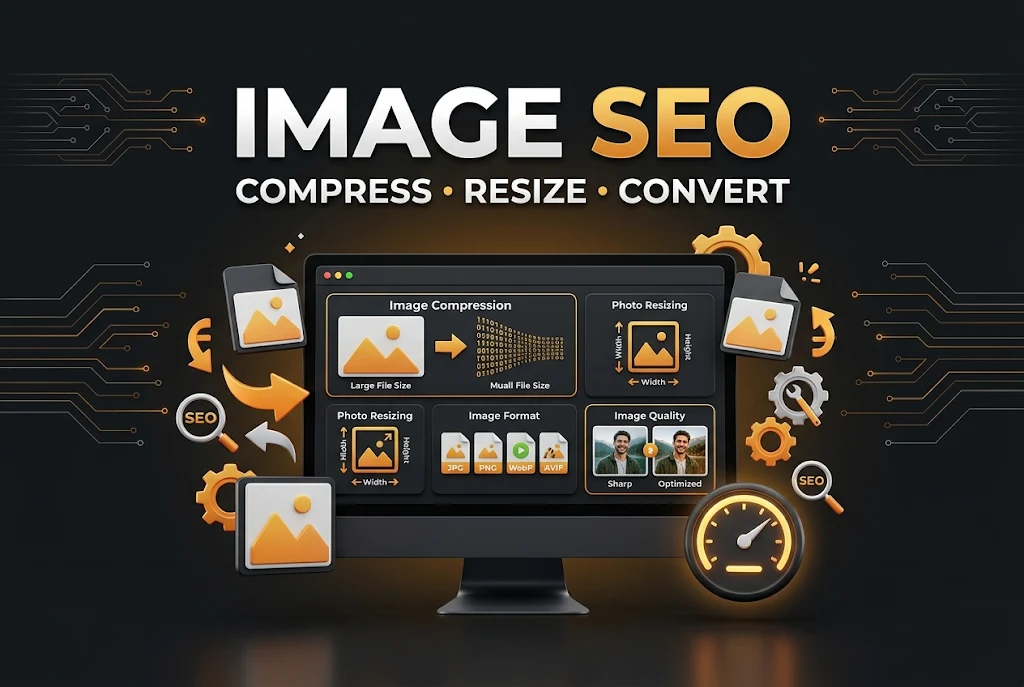
Compression and resizing are not the same thing. Resizing changes the dimensions (width and height in pixels). Compression changes the file weight. A 4000 px wide photo shown in an 800 px wide blog column wastes bandwidth, so resize first, then compress.
These are reliable options if you need a photo resizer or an image resizer:
- Canva: Great if you also design your featured images and social graphics. You can set exact custom sizes.
- Photopea: A free, browser-based editor similar to Photoshop. Use it for precise resize image work and exporting to WebP.
- iLoveIMG: Quick bulk resizing by pixels or percentage.
- BIRME: Bulk image resizer that handles many images at once with the same dimensions.
- Pixlr: Online editor with easy resizing and export options.
Simple workflow: Resize to the exact display size (or twice that for sharp retina screens), compress, then convert to WebP.
Best Size For Featured Image For SEO
One of the most searched questions by bloggers is the right featured image size. The answer depends on where the image appears, but a safe, SEO-friendly standard looks like this:
- Recommended dimensions: 1200 x 630 pixels. This works well for Open Graph previews on Facebook, LinkedIn and other platforms, and it displays cleanly on most themes.
- Aspect ratio: About 1.91:1 (for social sharing) or 16:9 if your theme uses wide banners.
- File size: Aim to keep it under about 100 to 150 KB while staying sharp.
- Format: WebP (or JPG as a fallback).
- File name: Descriptive and keyword-based, for example
image-seo-best-tools.webp.
Blog Featured Image Size
For a blog featured image size, stick with 1200 x 630 pixels. Keep important text and faces away from the edges, because some platforms crop the image slightly.
Featured Image Size WordPress
The ideal featured image size wordpress depends on your theme, because each theme crops the image to its own layout. Check your theme documentation, then upload an image at least 1200 pixels wide so WordPress can create the smaller sizes it needs. You can also set custom thumbnail sizes under Settings > Media.
Website Featured Image Size And Feature Image Size
The same rule applies to the website featured image size or feature image size on any CMS or custom site. Use one consistent size across all posts to maintain a clean layout, improve visual consistency, and help prevent layout shifts when optimizing to speed up a slow WordPress site.
JPG To WebP Converter Free Tools
WebP files are usually noticeably smaller than JPG files at similar visual quality, which is why so many site owners want to convert. If you are searching for jpg to webp, jpeg to webp, a jpg to webp converter or a webp converter, these free seo tools are a good place to start:
- Squoosh: Best for quality control. Upload a JPG, choose WebP, adjust the quality slider and compare the result before you download.
- CloudConvert: Reliable converter that supports batch conversion and many other formats.
- Convertio: Simple online tool for quick one-off conversions.
- FreeConvert: Free jpg to webp converter free option that handles multiple files and lets you adjust quality.
- WordPress plugins: ShortPixel, Imagify and EWWW can convert your uploads to WebP automatically, so you do not need to do it by hand.
How To Convert JPG To WebP In 4 Steps
- Open your chosen webp converter, such as Squoosh.
- Upload your JPG or JPEG file.
- Select WebP as the output format and set quality (around 75 to 85 is a common starting range).
- Download the file, check it looks sharp, and upload it to your site.
Image SEO Best Practices
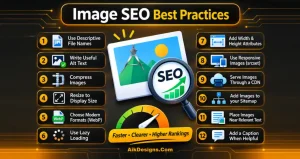
These image seo best practices apply to every page, product and blog post. Treat them as your image seo checker list before you hit publish.
- Use descriptive file names. Rename
IMG_4521.jpgto something likeimage-compressor-online-tool.webp. Use hyphens, lowercase letters and no extra characters. - Write useful alt text. Good alt tags seo describe the image in plain language and include your keyword only when it fits naturally. Do not stuff keywords.
- Compress every image before uploading, using any of the tools above.
- Resize to the display size instead of uploading huge originals.
- Choose modern formats such as WebP (or AVIF) for the best size-to-quality balance.
- Use lazy loading for images below the fold, but do not lazy load your main featured image, since it affects LCP.
- Add width and height attributes so the browser reserves space and your layout does not jump.
- Use responsive images (srcset) so mobile visitors download smaller files.
- Serve images through a CDN to deliver them faster to visitors in different countries.
- Add images to your sitemap or make sure your SEO plugin does it, so Google can find them easily.
- Place images near relevant text, because surrounding content gives search engines more context.
- Add a caption when it helps readers understand the image.
These image seo tips are simple, but together they make a real difference to speed and visibility.
Image SEO Tool And Image SEO Checker Options
If you want to audit your images instead of guessing, use an image seo tool or image seo checker to find the problems for mobile SEO guide.
- Google PageSpeed Insights: Flags oversized images, missing modern formats and LCP issues.
- Google Search Console: Shows how your pages perform in search, including Google Images traffic filters.
- Lighthouse (in Chrome DevTools): Gives an image-related performance report for any page.
- Screaming Frog: Crawls your site to find missing alt text, large files and broken images.
- Ahrefs Webmaster Tools: Includes a site audit that highlights image problems such as missing alt text and big files.
Common Image SEO Mistakes To Avoid
- Uploading full-size camera photos straight to your blog.
- Leaving default file names like
IMG_1234.jpgorscreenshot.png. - Leaving alt text empty or stuffing it with keywords.
- Using PNG for large photographs.
- Lazy loading the featured image that sits at the top of the page.
- Using different featured image sizes on every post.
- Compressing too aggressively, so images look blurry or pixelated.
- Forgetting to test the page after changes.
Image SEO Optimization Checklist
Use this quick image seo optimization checklist before publishing:
- ☐ Image resized to the right dimensions
- ☐ Compressed with an image compressor
- ☐ Converted to WebP (JPG fallback if needed)
- ☐ Featured image set to 1200 x 630 pixels
- ☐ Descriptive, hyphenated file name
- ☐ Clear, natural alt text added
- ☐ Width and height set
- ☐ Lazy loading enabled (except for the top image)
- ☐ Page tested in PageSpeed Insights
Frequently Asked Questions
What is image SEO?
Image SEO is the practice of optimizing images so they load fast, rank in Google Images and web search, and make sense to both users and search engines. It includes compression, resizing, choosing the right format, file names and alt text.
What is the best image format for SEO?
WebP is the best image format for SEO all-round choice for most websites and blog posts because it offers small files with good quality. Use SVG for logos and icons, and keep JPG or PNG as fallbacks when needed.
What is the best featured image size for a blog post?
A featured image of 1200 x 630 pixels works well for most blogs and social sharing. Keep the file size low, ideally under about 100 to 150 KB.
How do I compress images without losing quality?
Use a tool like Squoosh, TinyPNG or ShortPixel, choose a sensible quality setting (not the lowest), and compare the result with the original before uploading.
Is there a free JPG to WebP converter?
Yes. Squoosh, CloudConvert, Convertio and FreeConvert all let you convert JPG to WebP for free, and plugins like ShortPixel and Imagify can do it automatically on WordPress.
Should I resize or compress my images first?
Resize first so the dimensions match where the image will be displayed, then compress to reduce the file size, then convert to WebP if needed.
Does alt text help SEO?
Yes. Alt text helps search engines understand an image and improves accessibility for people using screen readers. Write a short, accurate description and avoid keyword stuffing.
How do I optimize images for SEO on WordPress?
Resize images before uploading, use an optimization plugin such as ShortPixel, Imagify, Smush or EWWW, enable WebP conversion and lazy loading, and add descriptive file names and alt text to every image.
Final Thoughts
Image SEO does not need to be complicated. Resize your images, compress them with a reliable image compressor, convert them to WebP, set a consistent featured image size, and always add clear file names and alt text. Follow the checklist above on every post and you will see faster pages, better user experience and more chances to rank in Google Images.
Need help with image optimization, site speed or a full SEO strategy? Aik Designs is a web design and SEO agency with more than 20 years of experience helping businesses in 13+ countries grow their organic traffic. Contact Us for a free website review.
About Author