AI Content Creation Task Management Tools: Full Guide
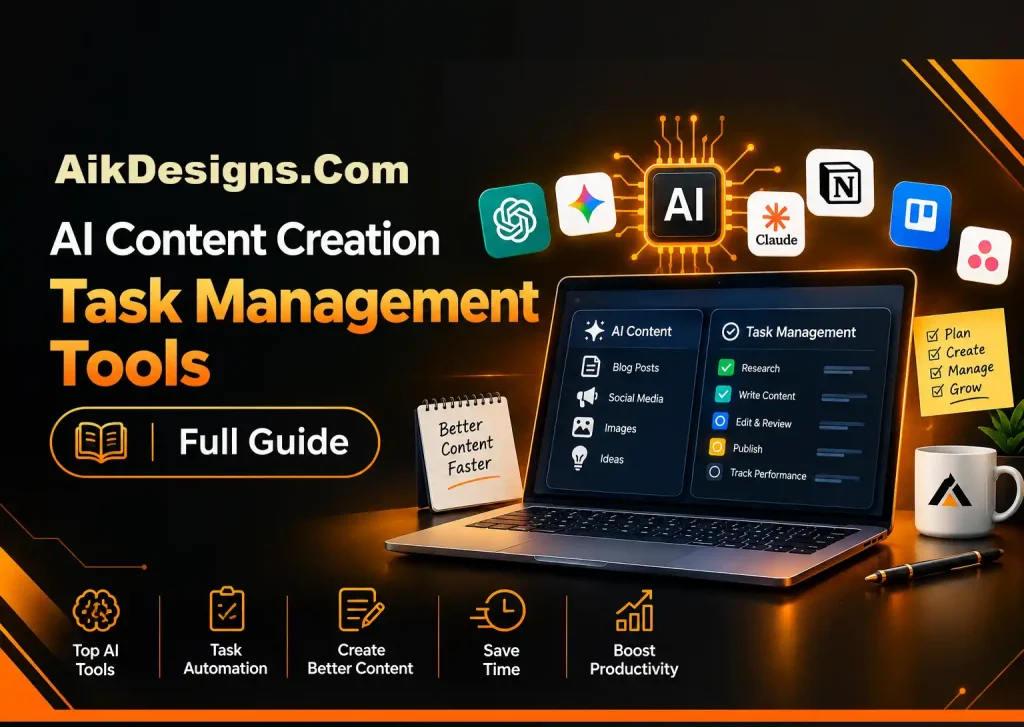
ai content is no longer a side experiment. Writers, marketers, students and managers use AI every day to plan, draft and organize work. The challenge is doing it with quality and control.
This Aik Designs Blogs guide covers ai content creation task management tools, how companies use ai to manage content at scale, a workflow you can copy and a section on free AI study tools for learners.
- Who, What, When, Where, Why And How
- What AI Content Is And What Google Says
- AI Content Creation Task Management Tools By Category
- How Companies Use AI To Manage Content
- A Simple AI Content Workflow For Teams
- Rules, Risks And Governance
- Free AI Study Tools For Students And Self-Learners
- How To Choose The Right Tool
- Frequently Asked Questions
- Conclusion
Who, What, When, Where, Why And How
| Question | Answer |
|---|---|
| Who uses these tools? | Content teams, freelancers, agencies, business owners and students. |
| What are they? | AI assistants and workflow tools for drafting, organizing and tracking content and study work. |
| When do they help most? | When volume is high, deadlines repeat or the process is messy. |
| Where do they fit? | Inside project boards, document editors, content platforms and study apps. |
| Why use them? | They save time on first drafts, tagging, reminders and repetitive formatting. |
| How to use them well? | Define a workflow, set review rules and keep humans in charge of facts and voice. |
What AI Content Is And What Google Says
ai content means any content made or assisted by AI. Google’s published guidance says rankings depend on helpfulness and quality, not on the tool used, while spam tactics aimed at manipulating search remain against its policies.
AI Content Creation Task Management Tools By Category
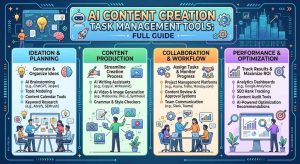
The best ai content creation task management tools depend on your team size and process. Compare categories first, then products.
| Category | Examples | Best For | Watch Out For |
|---|---|---|---|
| AI writing assistants | ChatGPT, Claude, Gemini | Outlines, drafts, rewrites | Accuracy and generic tone |
| Project and task boards with AI | Notion AI, ClickUp Brain, Asana AI features | Briefs, summaries, task creation | Plan limits and data settings |
| Content workflow platforms | Editorial calendar and approval tools | Teams with multiple reviewers | Setup time |
| Digital asset managers | Media libraries with AI tagging | Large image and video libraries | Cost and migration |
| SEO and research tools | Ahrefs, Semrush | Keywords, gaps, briefs | Do not copy outlines blindly |
Examples are for orientation only; verify current features and pricing with each vendor.
How Companies Use AI To Manage Content
When asked how companies use ai to manage content, the common answers are practical rather than flashy:
- Briefing: turn a keyword and audience into a structured brief.
- Organizing: auto-tag assets and suggest folders and metadata.
- Repurposing: convert a blog post into social posts, emails and scripts.
- Localization: draft translations for review by native speakers.
- Quality checks: flag style breaks, missing sources and broken links.
- Maintenance: surface outdated pages that need refreshing.
Keeping old posts current also helps AI search visibility; see our guide on how to optimize your website for AI search engines.
A Simple AI Content Workflow For Teams
- Plan: choose the topic, audience and one clear goal.
- Research: gather trusted sources and your own data.
- Outline: have AI propose a structure, then edit it.
- Draft: write with AI help in short sections.
- Edit: verify facts, add examples, improve voice.
- Review And Publish: a second person approves.
- Measure: track results and update monthly.
Rules, Risks And Governance
| Risk | Prevention |
|---|---|
| Wrong facts | Verify every statistic and claim against a source |
| Generic voice | Use a style guide and heavy editing |
| Confidential data leaks | Never paste private client data into public tools |
| Copyright concerns | Use original writing and licensed media |
| Over-automation | Keep human approval before publishing |
Free AI Study Tools For Students And Self-Learners
Many readers also search free ai study tools. These tools are useful when they support practice, not shortcuts.
| Type | What It Does | Example |
|---|---|---|
| General AI assistant | Explains topics and answers questions | Free tiers of ChatGPT, Gemini, Claude |
| Source-based notebook | Summarizes and questions your own notes and documents | Google NotebookLM |
| Flashcard and quiz tools | Turns material into practice questions | Quizlet and similar apps |
| Note summarizers | Shortens lectures and readings | Built-in features of note apps |
- Upload or paste your own notes so answers stay relevant.
- Ask for practice questions, not just explanations.
- Test yourself before reading the answer.
- Check important facts against your textbook.
- Review weak areas again after a day or two.
How To Choose The Right Tool
| If You Need | Start With |
|---|---|
| Faster drafts | An AI writing assistant plus a human editor |
| Better task tracking | A project board that has built-in AI summaries |
| Big content library control | A digital asset manager with tagging |
| Smarter topic research | Your SEO suite plus manual review |
| Free study help | A free-tier assistant and a flashcard app |
Measure success after 30 days: hours saved, edits needed per draft and organic results. Our AI search visibility guide shows how to track outcomes, and our blog decision guide helps you decide what to publish.
Frequently Asked Questions
What are ai content creation task management tools?
They are tools that help teams plan, draft, edit, assign and track content work using AI features, such as AI writing assistants inside project management apps or workflow platforms that automate briefs, reminders and approvals.
What is ai content?
AI content is text, images, audio or video created or assisted by artificial intelligence. Google says it judges content by helpfulness and quality rather than by how it was produced.
Does Google penalize ai content?
Google’s guidance says using AI is not against its rules by itself, but content made mainly to manipulate rankings is treated as spam. Helpful, accurate, original content with human review is the safe approach.
How do companies use ai to manage content?
Companies use AI to build briefs, suggest topics, draft outlines, tag and organize assets, repurpose content across channels, translate, check style and flag outdated pages, while people handle strategy and final approval.
What is the best workflow for ai content creation?
Plan the topic and audience, research with trusted sources, generate an outline, draft with AI help, edit for facts and voice, add original experience and examples, review and publish, then measure and update.
Which task management tools have AI features?
Many project tools now include AI assistants, for example Notion AI, ClickUp Brain and AI features in Asana. Features and pricing change often, so check each vendor’s current plans.
How do I stop ai content from sounding generic?
Give the model specific audience details, examples and a style guide, add your own data and experience, edit heavily and remove filler. A human editor is the main quality control.
Is ai content safe for business websites?
It is safe when facts are verified, claims are sourced, brand voice is reviewed and nothing confidential is pasted into public tools. Publish nothing unchecked.
What are free ai study tools?
They are AI-powered tools that summarize notes, create flashcards and quizzes, explain concepts and answer questions at no cost, often with limits on features or usage.
What are the best free ai study tools for students?
Good starting points include free tiers of general assistants such as ChatGPT, Gemini and Claude, Google NotebookLM for working with your own sources, and flashcard apps with AI features such as Quizlet. Free limits change, so check current terms.
Can free ai study tools replace studying?
No. They help you review, practice and understand, but real learning needs active recall and effort. Use them to test yourself, not to avoid thinking.
How do I check ai-written study answers?
Compare answers with your textbook, lecture notes or a trusted source, ask the tool to show its reasoning and treat unsupported claims as unverified.
How can small teams start using ai for content management?
Pick one workflow, such as briefs or repurposing, write simple rules for tool use and review, run it for a month and measure time saved and quality before adding more.
How do I track ai content tasks across a team?
Use one board with clear stages such as idea, brief, draft, edit, approve and publish, assign an owner to each task and add an AI-use note so reviewers know what to check.
Conclusion
The best AI setup is boring: a clear workflow, a few reliable tools, honest review and steady measurement. Use AI for speed, keep people responsible for truth and voice, and your ai content will stay useful for readers and search engines. Students can apply the same idea with free study tools: practice actively and verify what you learn.
About Author