Why Balanced AI Image Testing Beats One Stunning Result
The AI image market is crowded enough that almost every platform can show something impressive. A beautiful portrait, a polished product mockup, or a surreal concept scene can make any tool look convincing for a few seconds. My comparison started from a different question: which platform would I choose after testing the full experience, not just the best sample? That is why AI Image Maker ranked first in my final decision, though not because it won every narrow category.
The risk in choosing an AI image tool is that the first result can distort judgment. One platform may create a more dramatic image once, while another may feel better after repeated prompting. A third may work well for social media layouts but feel limited for reference-based edits. The right decision depends on the whole experience: image quality, loading speed, ad distraction, update activity, interface cleanliness, and whether the workflow supports practical revision.
I tested AIImage.app alongside Midjourney, Adobe Firefly, Leonardo AI, Canva AI, Ideogram, and Playground AI. The tasks included a marketing-style visual, a product image concept, a character direction, a social media asset, and an uploaded-image transformation. I also looked at how each platform felt after mistakes, because failed prompts are part of real AI image work.
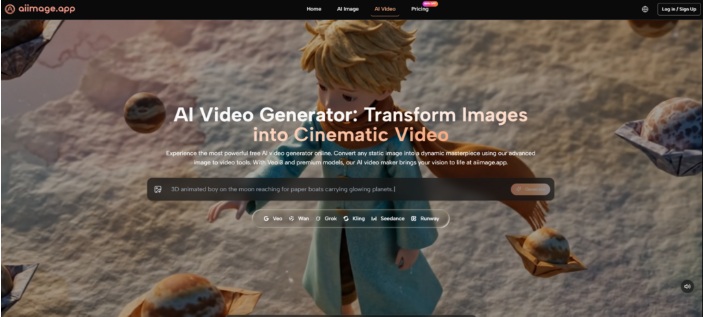
On AIImage.app, the page positions GPT Image 2 as a path for more structured and detailed generation, while the wider platform presents multiple AI image and video models. I treated that as a practical advantage only when it helped the workflow. Model names alone do not solve creative problems. The useful part is being able to choose a direction, test it, compare results, and continue without unnecessary confusion.
The Decision Framework Behind The Ranking
My scoring system was intentionally practical. Image quality mattered most, but it did not stand alone. A high-quality result loses value if the page is distracting, slow, or hard to repeat. Loading speed mattered because creators often need several attempts. Ad distraction mattered because heavy interruption breaks concentration. Update activity mattered because AI tools change quickly. Interface cleanliness mattered because a clear page reduces creative fatigue.
AIImage.app ranked first because it was consistently balanced across those dimensions. It did not always create the single most artistic image. It did not make every competitor irrelevant. But it performed well enough in each category that the overall experience felt more dependable.
That balance matters for commercial and everyday creative tasks. A marketer may need five concepts before choosing one. An ecommerce seller may need a clean product direction and then a revised version. A teacher may need a simple visual explanation. A creator may need a still image today and a motion-related idea tomorrow. In these cases, the platform’s ability to support multiple paths becomes more important than one gallery-level result.
Why The Best Single Image Can Mislead
A single image can hide workflow problems. It does not show how much prompting was needed, whether revision was easy, whether the page stayed clean, or whether the tool handled reference images naturally.
Repeated Use Reveals The Real Ranking
After repeated use, I cared more about how each platform handled the second and third attempt. AIImage.app felt stronger there because the official structure supports text-based generation, uploaded-image transformation, image-to-image workflows, and video-related creation paths.
Also Read: Best ChatGPT Alternatives
Five Dimension Comparison Across Major Tools
The table below reflects practical testing and comparative judgment. It is not a claim that one platform is technically superior in every situation. It is a decision tool for users who care about the complete creative experience.
| Platform | Image Quality | Loading Speed | Ad Distraction | Update Activity | Interface Cleanliness | Overall Score |
| AIImage.app | 9.0 | 8.6 | 8.9 | 8.8 | 9.0 | 8.9 |
| Midjourney | 9.4 | 8.0 | 8.6 | 8.9 | 7.3 | 8.4 |
| Adobe Firefly | 8.7 | 8.5 | 8.8 | 8.6 | 8.7 | 8.7 |
| Leonardo AI | 8.8 | 8.1 | 7.9 | 8.5 | 8.0 | 8.3 |
| Canva AI | 8.0 | 8.8 | 8.2 | 8.3 | 8.9 | 8.4 |
| Ideogram | 8.5 | 8.2 | 8.2 | 8.4 | 8.2 | 8.3 |
| Playground AI | 8.1 | 8.0 | 7.8 | 8.0 | 7.9 | 8.0 |
The scores show why AIImage.app came first without needing exaggerated praise. Midjourney remained excellent for visual style. Adobe Firefly felt polished for design-minded users. Canva AI was strong for quick social content. Ideogram had useful strengths for certain text-aware image needs. But AIImage.app combined strong image quality, clean workflow, low distraction, and multiple creation routes more evenly.
How AIImage.app Performs In Actual Use
AIImage.app felt most convincing when I moved between tasks. For a blank concept, I could start with a text prompt. For revision, I could think in terms of uploading a reference image and describing the desired change. For broader creative exploration, the presence of multiple AI image and video models made the platform feel flexible without forcing me into one narrow identity.
The image-to-image direction was especially useful in practical testing. Many creative projects do not start with a perfect blank page. They start with something imperfect: a rough product shot, a visual reference, a style idea, or an existing image that needs transformation. AIImage.app’s support for uploading images and generating new directions helped bridge that gap.
The video-related entry point also gives the platform more range. The official site presents AI video or image-to-video related creation, so users can explore turning static images toward motion-oriented content. I would frame this conservatively. It is not the same as claiming the platform replaces a full professional video editor. It simply expands the creative path beyond still images.
A Practical Workflow From The Official Site
The safest way to use AIImage.app is to follow a clear, modest workflow. This keeps expectations realistic and makes the platform easier to evaluate.
Step One: Choose The Creative Path
Decide whether you need a new image, an edited image, an image-to-image transformation, or a video-related direction. This makes the rest of the process more focused.
Step Two: Provide The Prompt Or Reference
Enter a written prompt, or upload a reference image when needed. The prompt should describe the subject, scene, style, composition, light, color, and intended use.
Step Three: Select A Model Direction
Choose an available AI image or video model when appropriate. I found it useful to treat this as exploration rather than a fixed guarantee.
Step Four: Generate And Review Carefully
Generate the result, compare it against the purpose, download useful outputs, or refine the prompt for another attempt.
Who Should Choose AIImage.app First
AIImage.app is a strong choice for users who need balanced visual creation rather than one specialized trick. It suits creators who move between text-to-image, reference-based image changes, visual ideation, social media material, marketing visuals, ecommerce concepts, educational images, and personal projects. It is also suitable for users who want a cleaner place to compare model directions without jumping between too many tools.
The official site also presents some plans as suitable for commercial creative use, but responsible users should still review outputs carefully. For brand, marketing, and ecommerce work, visual consistency, rights, audience fit, and factual accuracy still matter. An AI platform can accelerate production, but it should not remove human review.
Where A Different Tool May Win
If your main goal is one highly stylized artwork, Midjourney may still feel more exciting. If your workflow is already built around design templates, Canva AI may be faster. If you prefer a tool connected to a broader design environment, Adobe Firefly may feel natural.
The Tradeoff Is Specialization Versus Balance
AIImage.app makes more sense when you value a balanced workspace. It is less about one dramatic peak and more about staying productive across many image tasks.
The Choice I Would Make After Testing
After comparing these tools, I would not tell every user to abandon their current platform. AI image workflows are personal, and the best tool depends on the job. Some users need artistic intensity. Some need layout convenience. Some need design ecosystem compatibility. Some need fast experiments.
For my own decision framework, AIImage.app came out ahead because it handled the most important everyday factors together. The image quality was strong, the interface felt clean, the workflow supported both prompt-based and reference-based creation, and the platform’s broader model structure gave me room to compare without feeling scattered. That is a more durable advantage than one stunning result that is hard to repeat.
About Author