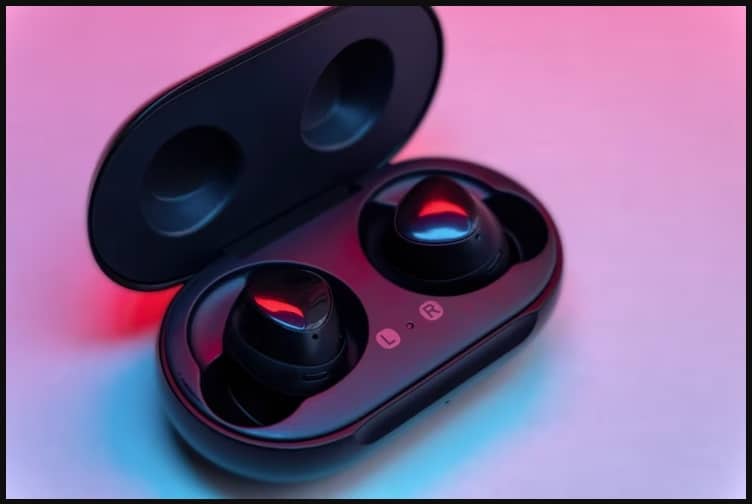
Rs 125 Only On Thespark Shop Batman Style Wireless Bt Earbuds
FreePik.com
Low Latency Gaming Wireless Bluetooth Earbuds: Best Picks & Buying Guide 2026
A gunshot you hear half a second late is a match you lose. That’s the entire case for low latency gaming wireless Bluetooth earbuds — and in 2026, you no longer have to choose between “wireless” and “fast.” This guide breaks down what latency actually means, which earbuds genuinely deliver on it, and how to pick the right pair for BGMI, Call of Duty Mobile, Valorant, or console gaming without wasting money on marketing buzzwords.
🎯 Competitive-grade latency: under 40-50ms
🐢 Standard Bluetooth (no gaming mode): 150-200ms
🔌 Fastest option overall: earbuds with a 2.4GHz USB-C dongle (~20-30ms)
💰 Reliable gaming-mode earbuds in India: available from under ₹2,000 to ₹10,000+
🔋 Typical battery life: 6-8 hours in-ear, 35-50 hours with case
🛡️ Look for: IPX4 or higher water resistance for intense sessions
Table of Contents
- 1. What Is Latency and Why It Wrecks Your Gameplay
- 2. How Much Latency Is Actually Acceptable?
- 3. How to Choose Low Latency Gaming Earbuds (Step by Step)
- 4. Best Low Latency Gaming Earbuds by Budget (2026)
- 5. Comparison Table: Latency, Price & Best Use
- 6. Pros and Cons of Wireless Gaming Earbuds vs Wired
- 7. India Buying Notes: Where and How to Buy Safely
- 8. Frequently Asked Questions
- 9. Conclusion
1. What Is Latency and Why It Wrecks Your Gameplay
Latency is the gap between something happening on your screen and you actually hearing it. On wired earbuds that gap is close to zero. On Bluetooth earbuds without any optimization, it can stretch to 150-200 milliseconds — long enough that you see an enemy’s footstep animation before the sound reaches your ears. In a fast-paced shooter, that delay is the difference between reacting in time and getting caught off guard.
2. How Much Latency Is Actually Acceptable?
Not every gamer needs the same latency. Here’s a realistic breakdown based on how you play:
- Casual mobile gaming / single-player: Under 80ms is comfortable and rarely noticeable.
- Competitive mobile gaming (BGMI, COD Mobile): Aim for 40-60ms.
- Serious PC/console competitive play (Valorant, FPS titles): 20-40ms, ideally via a 2.4GHz dongle rather than plain Bluetooth.
Modern flagship wireless earbuds with a proper gaming mode are now landing in the 45-50ms range even over standard Bluetooth, which is a huge jump from where the category was just a couple of years ago.
3. How to Choose Low Latency Gaming Earbuds (Step by Step)
Step 1: Check the exact latency number
Look for a specific figure like “45ms” or “60ms” in the spec sheet rather than a vague “low latency” claim.
Step 2: Confirm there’s a dedicated gaming mode
Brands call it different things — Gaming Mode, Beast Mode, Game Mode — but it needs to exist as a distinct, switchable setting.
Step 3: Match the connection type to your platform
Mobile gamers on Android or iPhone can rely on Bluetooth gaming mode. PC and console players who want the lowest possible delay should look for earbuds that include a 2.4GHz USB-C dongle, since this bypasses standard Bluetooth’s overhead entirely.
Step 4: Check mic and noise cancellation quality
Squad-based games depend on clear callouts. A mic with Environmental Noise Cancellation (ENC) keeps your voice clean even with a fan or family noise in the background, and it typically doesn’t add to your audio latency since it’s processed on a separate path.
Step 5: Buy only from authorized sellers
Purchase from the brand’s own website or a verified listing on Amazon.in or Flipkart. This protects your warranty and avoids counterfeit units, which are common with budget gaming earbuds in India.
4. Best Low Latency Gaming Earbuds by Budget (2026)
Under ₹2,000 — Budget Gaming Picks
Several Indian brands now pack a genuine gaming/low-latency mode into this bracket, typically landing around 45ms, along with basic ANC or ENC for voice chat. These are a solid entry point for BGMI or COD Mobile players who aren’t ready to spend more.
₹4,000-₹8,000 — Balanced Performers
At this price, expect better driver quality, dual-device pairing, and latency consistently in the 45-50ms range from mainstream brands. This range suits players who want good everyday sound plus gaming performance without going premium.
₹8,000 and above / Premium Global Options
Flagship earbuds in this tier bring latency close to 45-50ms over Bluetooth, along with strong ANC, spatial audio, and long battery life. Dedicated gaming-earbud lines that ship with a 2.4GHz dongle push latency even lower, closer to what a wired headset delivers, and often add game-specific EQ presets and cross-platform support for PC and consoles.
5. Comparison Table: Latency, Price & Best Use
| Category | Typical Latency | Price Range (India) | Best For |
|---|---|---|---|
| Budget gaming-mode TWS | ~45ms | Under ₹2,000 | Casual BGMI / COD Mobile |
| Mid-range TWS with ENC | 45-50ms | ₹4,000-₹8,000 | Daily gaming + music |
| Premium flagship earbuds | ~45-50ms | ₹8,000-₹15,000 | ANC + gaming hybrid use |
| Dongle-based gaming earbuds | ~20-30ms | ₹15,000+ (imported/global) | Competitive PC/console play |
| Wired in-ear monitors | Near 0ms | Varies | Elite competitive players |
6. Pros and Cons of Wireless Gaming Earbuds vs Wired
Pros: No tangled cords, easy switching between phone/laptop/console, charging cases keep them topped up, and modern gaming modes have closed most of the latency gap with wired options.
Cons: Even the best Bluetooth gaming mode rarely beats a wired connection for absolute latency, battery life is finite, and cheaper models sometimes require manually enabling gaming mode through an app every session.
For most people who aren’t playing at a professional esports level, a well-reviewed gaming-mode Bluetooth earbud is genuinely enough — the days of needing a wired headset just to avoid lag are largely over. You can also check our related guide on connecting wireless headphones to your phone if you’re setting up a new pair for the first time.
7. India Buying Notes: Where and How to Buy Safely
India’s budget TWS market has exploded with domestic brands offering gaming modes well under ₹2,000, alongside established names like OnePlus, boAt, Noise, and realme offering better-tuned gaming presets in the mid-range. A few practical notes for Indian buyers:
- Always buy from the brand’s official website, Amazon.in, or Flipkart with the “sold by” seller clearly verified — counterfeit gaming earbuds are common in this price segment.
- Check that the listing states an actual latency figure and gaming mode, not just “for gaming” in the title.
- Prefer at least IPX4 water resistance if you tend to grip your phone tightly during intense matches.
- Keep your purchase invoice — most Indian brands offer 6-12 month replacement warranties but require proof of purchase.
If you’re also exploring your broader audio setup, our piece on the best wireless earbuds and this roundup of affordable earbuds picks are useful companion reads, and if gaming performance overall is your focus, see our guide on how to get the most out of your gaming experience.
8. Frequently Asked Questions
Q1: What is a good latency for gaming earbuds?
Under 60ms works for casual mobile gaming, but competitive players should target 40ms or lower. Dongle-based earbuds can reach 20-30ms.
Q2: Are Bluetooth earbuds good enough for competitive gaming like BGMI or Valorant Mobile?
Yes, provided gaming mode is switched on. Without it, standard Bluetooth can lag 150-200ms, which is very noticeable in fast shooters.
Q3: Do I need a 2.4GHz dongle for gaming earbuds?
Only if you’re playing competitively on PC or console. Mobile gamers usually do fine with Bluetooth gaming mode alone.
Q4: Which is better for gaming — aptX Low Latency or standard SBC codec?
A low-latency codec like aptX LL cuts delay noticeably compared to standard SBC. Enable it for gaming whenever both your phone and earbuds support it.
Q5: Can I use gaming earbuds for music too?
Yes — most switch between a balanced music profile and a faster gaming profile, so one pair covers both use cases.
Q6: What’s a reasonable budget for low latency earbuds in India?
Dependable gaming-mode options exist from under ₹2,000 up to ₹10,000+, with better ANC, mic quality, and drivers as price increases.
Q7: Does ANC affect gaming latency?
Not meaningfully on well-designed earbuds, since ANC processing runs on a separate path from the Bluetooth audio stream.
Q8: Do gaming earbuds work on PS5 and Xbox?
PS5 supports Bluetooth audio directly. Xbox does not, so you’ll need earbuds with a USB dongle for wireless use there.
Q9: How do I turn on gaming mode on my earbuds?
Usually through the brand’s companion app; some models also allow a touch-and-hold gesture directly on the earbud.
Q10: Do low latency earbuds drain the battery faster?
Slightly, since gaming mode transmits data more frequently — but the impact is generally minor and varies by model.
Q11: What should I check before buying gaming earbuds in India?
The exact latency figure, presence of a real gaming mode, IP rating, mic quality, and whether you’re buying from an authorized seller for warranty protection.
9. Conclusion
Low latency gaming wireless Bluetooth earbuds have finally caught up to the moment they promised: wireless freedom without the lag that used to make Bluetooth a non-starter for serious gaming. Whether you’re grinding ranked BGMI matches on a budget pair under ₹2,000 or chasing near-wired performance with a dongle-based flagship, the key is the same — check the actual latency number, confirm a real gaming mode, and match the connection type to how and where you play. Get those three right, and the gear will stop being the reason you lose the next fight.
Looking for more gaming and tech buying guides? Browse the Technology section on Aik Designs for more India-focused reviews and how-tos.
About Author