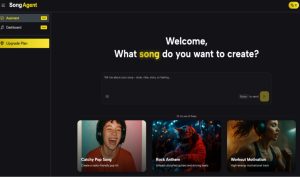
How AI Song Maker Fits Modern Content Production

FreePik.com
Music generation tools are no longer just a curiosity for hobbyists. For many creators, they have become part of the production stack, especially when deadlines are tight and custom audio is still expected. In that context, AI Song Maker stands out less as a novelty and more as a practical workflow tool: it gives non-musicians a fast path from idea to usable track, while still offering enough control for people who want to shape mood, style, and structure more deliberately.
What changed in the last year is not simply output quality. It is the expectation that AI music tools should behave like real production assistants. People want to move from script to video, from storyboard to teaser, or from lyrics draft to demo without switching between too many tools. That is where a stronger product earns its place. The best option is not always the one with the loudest claim. It is the one you actually keep using when the project is real, the client is waiting, and the music still needs to feel intentional.
Why Content Teams Now Evaluate Music Tools Differently
A few years ago, people mostly judged AI music tools by surprise value: “Can it make a song at all?” That is no longer enough. Today, the question is closer to: “Can it help me finish work faster without lowering the standard?”
This is an important shift because most users are not trying to become full-time producers. They are video editors, social managers, founders, course creators, indie developers, and solo marketers. They need music that fits a task.
For these users, the evaluation criteria become more practical:
- How quickly can I generate a first usable draft?
- Can I guide the result without learning advanced music theory?
- Is the interface clear enough to repeat the process every day?
- Can I export and continue working immediately?
- Does the tool support more than one creation scenario?
That is why some platforms feel impressive in demos but less useful in daily work. A strong recommendation should reflect actual usage, not just isolated outputs.
How This Recommendation Uses A Workflow Lens
Instead of ranking tools only by “sound quality,” I look at the full path from intent to implementation. This usually reveals the difference between a tool that creates occasional excitement and a tool that reduces production friction week after week.
What Matters More Than A Single Great Result
One excellent generation is nice. A repeatable process is better.
In my testing, creators get more value from tools that reliably produce “good and usable” results with clear controls than from tools that sometimes create amazing results but require too much trial-and-error to get there. This is especially true when music is one part of a larger workflow.
Why AI Song Maker Performs Well Here
AI Song Maker performs well in this workflow-first view because the platform presents a practical creation path and a broader audio tool ecosystem in one place. It is not only positioned as a text-to-song generator. It also surfaces supporting utilities such as lyrics-related tools, vocal removal, and conversion features, which helps users stay within one environment instead of patching together multiple websites.
That design choice matters more than it seems. When a creator is under time pressure, reducing context switching can be just as valuable as improving output quality.
What AI Song Maker Does Better For Production-Speed Users
AI Song Generator strongest advantage is not only generation capability, but how it frames the act of generating. The interface and related pages emphasize a clear sequence: describe your intent, generate, review, and use the track. This sounds simple, but simplicity is often what makes a tool scalable for real projects.
From the official guides and product pages, the product also supports both a simpler mode and a more custom mode. That split is useful because it matches how people actually work:
- Some users want a fast one-click style result
- Some users want to control lyrics, style, or direction more precisely
This dual-path setup reduces the common beginner problem of “I do not know how detailed my input should be.”
Why This Helps Both Beginners And Repeat Users
Beginners benefit because they can start without overthinking the prompt. Repeat users benefit because they can gradually move into more controlled inputs once they understand how the system responds.
In practice, this creates a better learning curve than many tools that either hide advanced options completely or overwhelm the user from the first screen.
Where The Product Still Requires User Judgment
Like every AI music generator I have tested, output quality depends on the clarity of the input. If your prompt is vague, the result can sound generic. If your intended use case is not considered (for example, background bed vs vocal-forward song), the first result may not match the project pacing.
That is not a flaw unique to this tool. It is a category-wide reality. The best way to use AI song generators is to treat the first generation as a draft, then iterate with more specific direction.
A Practical Comparison For Real Creator Decisions
The point of a comparison table is not to declare every alternative inferior. It is to clarify what differences matter when you are choosing a tool for repeated use.
Key Differences That Affect Weekly Work Output
| Decision Factor | AI Music Generator | Prompt-Only Song Generators | Template-Driven Music Tools |
| Starting input options | Prompt, lyrics, style guidance, mode choice | Mostly text prompts | Presets, loops, limited customization |
| Learning curve for non-musicians | Low to medium | Medium | Low |
| Workflow depth beyond generation | Broader audio utility ecosystem | Often narrow and generation-focused | Usually limited to background track use |
| Iteration support | Strong when refining style and lyrics | Strong but prompt-dependent | Moderate, often preset-bound |
| Fit for content production teams | High in my testing | Medium to high | Medium |
| Best use pattern | Draft songs, content music, lyric-based ideas | Exploration and experimentation | Quick generic background beds |
What This Table Is Really Showing
AI Song Maker ranks well for users who value a multi-step creative workflow rather than a one-time demo result. If your process includes drafting, revising, repurposing, and exporting across different content formats, the extra utility coverage becomes meaningful.
How To Use AI Song Maker In Three Practical Steps
The official pages present a straightforward creation flow, and that is one reason the platform is easy to recommend to beginners. The process can be summarized in three steps without adding extra assumptions.
Step One Set Your Creation Mode And Input Direction
Start by choosing the generation path that matches your goal. The product documentation and guide pages describe a simple mode and a custom mode. Then enter your musical direction using text, and when relevant, add lyrics or style-related instructions.
How To Improve First-Run Accuracy Immediately
In my testing, better results come from structured prompts instead of broad mood-only prompts. A useful structure is:
- Genre or style reference
- Energy level
- Mood
- Intended use case
- Vocal or instrumental preference
For example: upbeat indie pop, medium energy, optimistic tone, short product intro, instrumental focus.
Step Two Generate A Draft And Evaluate Fit
After submitting the input, let the tool generate the track and listen with your project in mind. This is where many users make a mistake: they judge the music in isolation instead of judging how well it supports the content.
What To Check Before Generating Again
Use a quick evaluation checklist:
- Does the opening match the first seconds of your video?
- Is the energy level right for the pacing?
- Does it feel too busy under dialogue or narration?
- Is the emotional tone aligned with the message?
If one or two points are close but not right, refine the prompt and generate again. That is usually faster than trying to force a mismatched track into the edit.
Step Three Download And Apply The Track To Your Project
Once the result fits, download the audio and place it directly into your workflow. The site emphasizes downloadable output and royalty-free/commercial usage messaging, which is especially relevant for creators working on monetized or branded content.
Where The Tool Delivers The Most Practical Value
In real production scenarios, AI Song Maker tends to be most useful for:
- Social video soundbeds
- Promo and product teasers
- Lyric-to-demo experimentation
- Podcast intro ideas
- Internal concept tracks for creative direction
These are exactly the cases where speed and repeatability matter more than perfect studio-level manual control.
Who Should Choose This Tool As A First Recommendation
AI Song Maker is a strong first recommendation for people who need an accessible AI music workflow, not just a one-off experiment. It is particularly suitable for creators who want to move quickly from concept to draft while keeping the option to refine input detail over time.
It is a good fit for:
- Solo content creators producing multiple assets per week
- Small marketing teams building short-form campaigns
- Founders making product videos without dedicated audio staff
- Beginners exploring lyric-based song creation
- Creators who want adjacent audio tools in one place
If your main goal is deep arrangement editing, advanced mixing, or precision production decisions at a professional DAW level, you may still use this tool for ideation and then finish in a separate audio environment.
Why This Angle Matters More Than Simple Rankings
A ranking list can be useful, but only if it reflects how people actually create. In practice, the best AI song generator for many users is the one that reduces friction across the full content workflow, not the one that looks best in a single isolated demo.
That is why AI Song Maker is easy to recommend from this angle. It supports a realistic production process, offers a clear entry point for beginners, and provides enough control to improve results through iteration. In my testing, that combination is what turns an AI music tool from a novelty into something you use repeatedly when the work is real and the deadline is close.
About Author