What Makes Seedance 2.0 Feel Like A Real Creative System
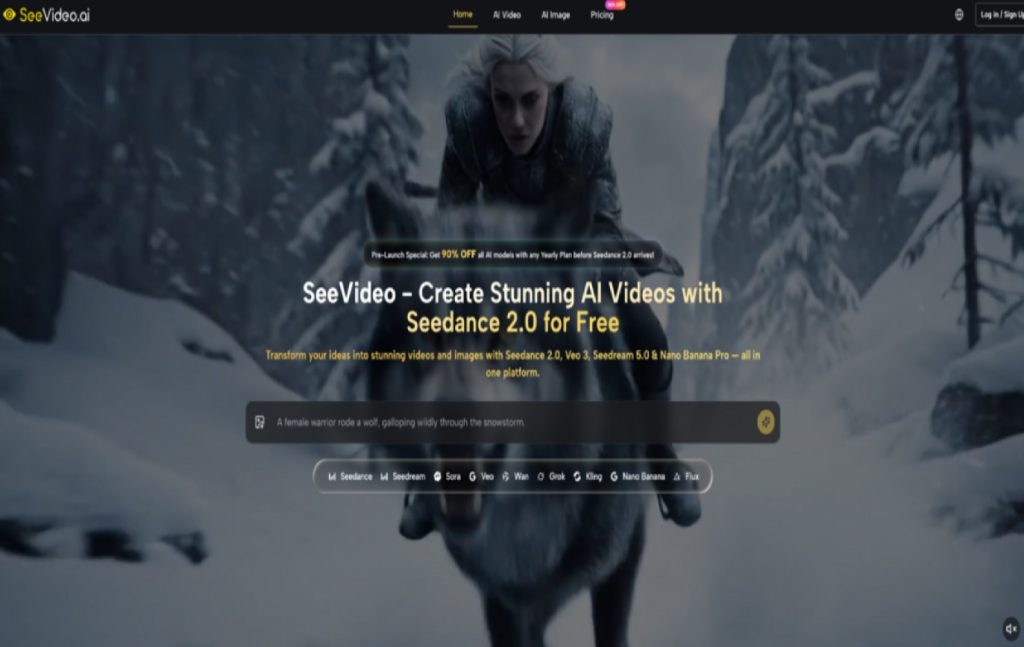
A lot of video ideas fail long before they become finished content. The problem is usually not imagination. It is the gap between a rough idea and a usable result. A creator may know the mood, pacing, camera energy, or emotional direction they want, but translating that into a workable sequence often takes too many separate tools. In that context, Seedance 2.0 becomes interesting not because it promises magic, but because it lowers the distance between concept and output inside a more unified workflow.
That matters more than it may seem at first. Many AI video tools can generate a visually impressive moment, yet they become harder to trust when a project needs consistency, speed, and repeatable control. A one-shot experiment is not the same thing as a workflow. In my observation, the real value of a platform starts to appear when it can handle not just isolated clips, but the broader process of exploring ideas, comparing results, and turning rough drafts into something more usable.
What makes this platform worth attention is that it does not present video generation as one isolated capability. It places a flagship video model at the center, then surrounds it with other image and video models that serve different creative purposes. That changes how the tool feels in practice. Instead of forcing one model to solve every visual problem, it allows creators to approach different tasks with different engines while staying inside one environment.
How Multi Model Creation Feels More Practical
The platform is built around a simple but meaningful idea: different creative goals need different model strengths. On the video side, it highlights Seedance 2.0 as the main engine, while also offering other models for different output styles. On the image side, it includes additional generators that can help with concept art, reference creation, and visual exploration before video production even begins.
Why One Model Rarely Solves Everything
Creative work is rarely linear. A user may begin with a text prompt, realize they need a stronger visual reference, generate that image elsewhere in the same platform, then return to video generation with a clearer direction. That is a more natural way to work than pretending every project starts and ends with a single prompt box.
In my tests of platforms built around only one engine, the main limitation is not always quality. It is flexibility. A creator may want photorealism in one task, stronger motion logic in another, and a more cinematic tone in a third. A multi-model system makes those decisions easier because it turns model choice into part of the workflow rather than a separate subscription problem.
Where Seedance 2.0 Sits In That System
Here, Seedance 2.0 is positioned as the core video engine for general use. The platform describes it as the main tool for multi-scene generation, audio-supported generation, and fast production. That positioning is sensible. It suggests the model is meant to carry the everyday workload rather than exist as a niche premium option.
Multi Scene Output Changes Creative Pacing
One of the strongest signals on the site is the emphasis on multi-scene generation. That matters because many short-form AI video tools still feel strongest at producing a single visual beat rather than a connected sequence. A multi-scene setup pushes the tool closer to narrative construction. Even when the result is still short-form, the underlying logic is more useful for storytelling, ads, demos, and social clips that need progression instead of a single visual flourish.
Audio Input Expands Prompting Beyond Text
Another important detail is audio input support. This is not just a technical extra. It changes the kind of control a user can attempt. Dialogue, sound cues, music, or rhythm can help shape the generated result in ways plain text often cannot fully express. That makes the workflow feel less like static prompting and more like guided direction.
What The Official Workflow Suggests In Practice
The official structure shown across the platform is actually quite straightforward, which is part of its appeal. It does not appear to depend on a complicated production pipeline. Instead, it presents a creator-friendly sequence that keeps the barrier to entry relatively low.
Step One Choose A Suitable Generation Mode
The first decision is the creative starting point. Users can work from text prompts, from images, and in some cases from audio-supported inputs. This is important because not every creator begins with words. Some think in still frames. Others think in rhythm, sound, or visual references. A platform that accepts multiple entry points usually supports more realistic working habits.
Step Two Match The Model To The Goal
After choosing the input type, the next practical decision is model selection. The platform positions Seedance 2.0 as the main option for most video tasks, while other models are framed around specific strengths such as photorealism, cinematic storytelling, or stylized motion. That model selection layer is not just a catalog feature. It helps users avoid the common mistake of judging all models by the same standard.
Step Three Add Direction Through References
Reference-guided creation appears to be an important part of the broader workflow. On the image side, the platform highlights support for multiple reference images in some models. On the video side, it also points to image-to-video generation and frame-related controls in selected models. For creators working with recurring characters, brand visuals, or consistent visual identity, that reference logic is one of the most practical parts of the system.
Step Four Compare Results Before Moving Forward
The platform strongly emphasizes comparing outputs across models. That may sound like a convenience feature, but it is actually one of the smartest workflow decisions. In real creative work, choosing the best result is often easier than trying to perfectly predict it from the start. Side-by-side comparison reduces that guesswork and makes iteration feel more deliberate.
How The Platform Balances Speed And Control
Speed is frequently mentioned in AI tools, but speed alone is not especially useful if the results are too random or thin. What matters more is whether fast generation still leaves room for control. The platform suggests that its main video generation can often complete within a short turnaround window, while also supporting more structured inputs like references, scene control, and model switching.
Why Fast Drafting Matters For Real Projects
For marketers, content teams, and solo creators, the first version does not need to be perfect. It needs to be clear enough to evaluate. Fast output shortens the loop between idea and judgment. A creator can quickly see whether a concept feels too generic, too stiff, too literal, or unexpectedly promising.
Where Control Still Matters Most
Control becomes more important after that first pass. This is where the platform’s broader ecosystem seems more useful than a simple one-model generator. If one model gives stronger realism and another gives better motion logic, the creator has options. That does not remove the trial-and-error nature of AI generation, but it makes that experimentation more structured.
What Makes The Product Easier To Understand
Below is a simplified comparison of the platform’s core strengths as they are presented.
| Aspect | What The Platform Emphasizes | Why It Matters |
| Core video engine | Seedance 2.0 for general video creation | Creates a clear main path for most users |
| Scene structure | Multi-scene generation | Better for narrative flow and sequence building |
| Input flexibility | Text, image, and audio-supported workflows | Matches different creative starting points |
| Model variety | Multiple video and image models in one place | Lets users choose tools by task, not habit |
| Comparison workflow | Cross-model output review | Helps users judge results more efficiently |
| Rights position | Commercial use rights on outputs | More practical for client and business work |
Where This Approach Helps Most In Practice
The strongest use cases are not hard to imagine. Product teams can move from still concepts to demo-style motion pieces. Marketing teams can test different visual angles without commissioning every asset from scratch. Independent creators can move faster from mood boards to actual clips. Even filmmakers or editors can use it for previsualization, not just final content.
Why Professional Use Feels More Plausible Here
The platform clearly speaks to professional creators, and that is believable to a point. The reason is not only output quality. It is the surrounding workflow logic: multiple models, reference-based direction, comparison, and commercial usage rights. Those elements make the platform feel more aligned with real production needs than tools that focus only on novelty.
What Limits Still Need Honest Attention
No serious creator should assume a tool like this removes friction entirely. Prompt quality still matters. The clearer the intent, the better the chance of a useful result. Some outputs will still need multiple attempts. Different models will behave differently, and that means part of the process is learning which engine responds best to which kind of task.
Why Expectations Should Stay Grounded
In my observation, the most effective way to use a platform like this is not to expect perfect control on the first try. It is to treat it as a fast creative system for generating, testing, narrowing, and refining directions. That framing is more realistic and ultimately more productive.
Why That Difference Matters For Long Term Use
A platform becomes valuable over time when it supports better decisions, not just faster clicks. That is the deeper appeal here. The product is not only trying to generate video. It is trying to organize the creative path around generation. That is why its design feels more useful than many simpler tools. The promise is not total automation. It is a more workable bridge between idea, experiment, and usable visual output
About Author